Acer
LCD monitoren
XV273KP
Acer XV273KP Handleiding
Hier is de Acer XV273KP (LCD monitoren) gebruikershandleiding. 3 pagina's in taal Engels met een gewicht van 0.4 Mb. Als u geen antwoorden op uw probleem kunt vinden Vraag het onze community.
Pagina 1/3
English
Acer LCD Monitor Quick Start Guide (QSG)
Important safety instructions
Please read the following instructions carefully.
1. To clean the LCD monitor screen:
• Turn off the LCD monitor and unplug the power cord.
• Spray a non-solvent cleaning solution onto a rag and clean the screen gently.
2. Do not place the LCD monitor near a window. Exposing the monitor to rain, moisture or sunlight can severely damage
it.
3. Do not apply pressure to the LCD screen. Excessive pressure may cause permanent damage to the display.
4. Do not remove the cover or attempt to service this unit yourself. An authorized technician should perform servicing of
any nature.
5. Store the LCD monitor in a room with a temperature of -20° to 60° C (-4° to140° F). Storing the LCD monitor outside
this range may result in permanent damage.
6. Immediately unplug your monitor and call an authorized technician if any of the following circumstances occur:
• Monitor-to-PC signal cable is frayed or damaged.
• Liquid spills onto the LCD monitor or the monitor is exposed to rain.
• The LCD monitor or case is damaged.
7. In order to prevent damage to the LCD pannel, do not place the monitor face down on a surface.
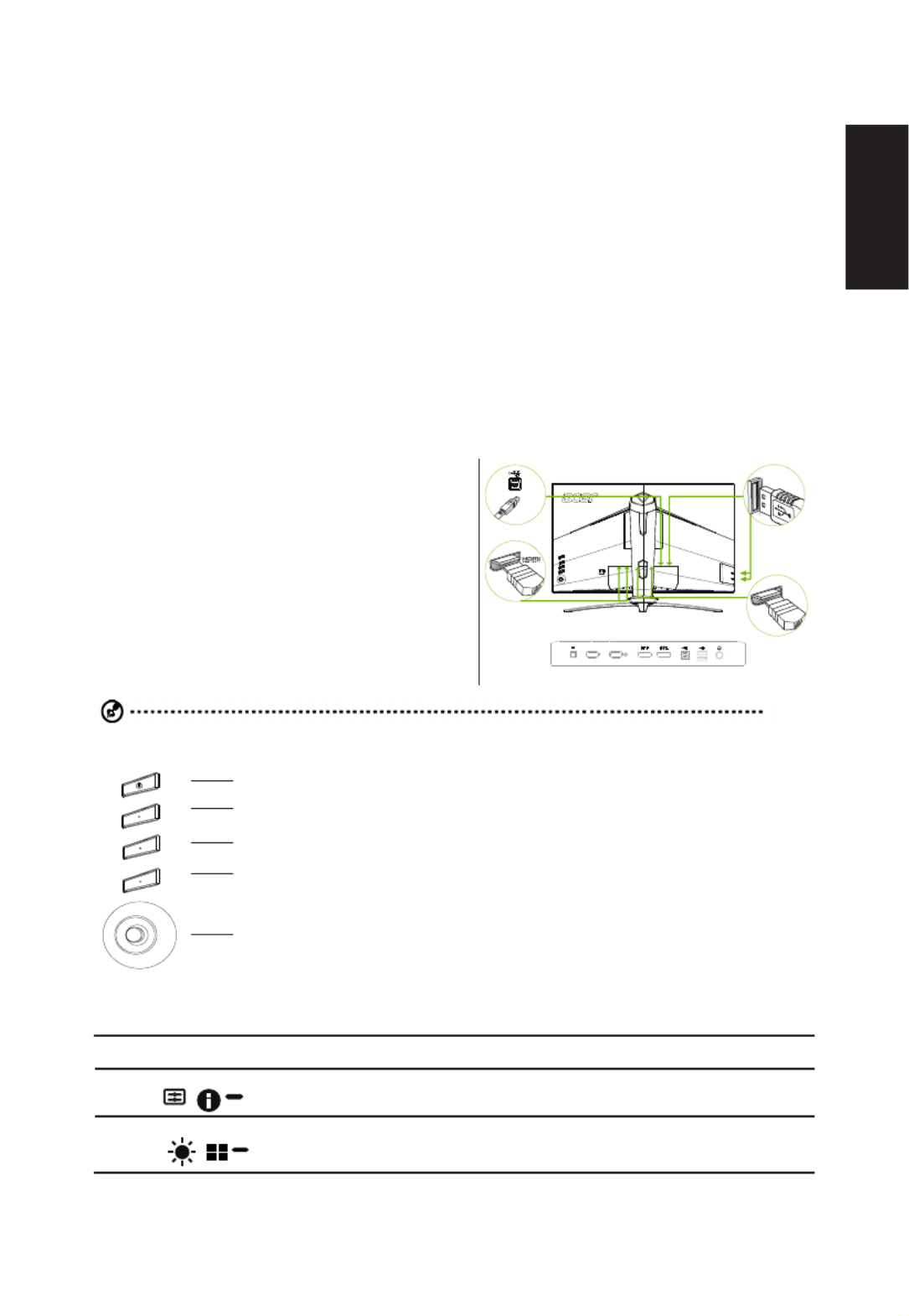
Connecting your monitor to a computer
1. Turn off your computer and unplug your computer's power
cord.
2. Connect the signal cable to the HDMI (optional) and /
or DP (optional) input socket of the monitor, and the
HDMI (optional) and /or DP (optional) output socket of
the graphics card on the computer. Then tighten the
thumbscrews on the signal cable connector.
3. Connect the USB Cable(Optional)
Connect the USB 3.0 cable to port for fast charge.
Connect the USB 3.0 cable to port.
4. Insert the monitor power cable into the power port at the
back of the monitor.
5. Connect the power adapter and power cord to the monitor,
then to a properly grounded AC outlet.
USB
DP
HDMI 1(2.0) HDMI 2(2.0)
Note: Audio output is only for audio output model. Please check user manual for more instruction.
1
2
3
4
5
External controls
1 Power button Turns the monitor on/off.Blue indicates power on. Amber indicates standby/ power saving mode/
OSD locked.
2 Function key
/
a. Press to view Main page. Press again to enter hotkey1 function.
b. When the Function Menu is active, press this key to view the basic information for your monitor
and current input or reset the custom color settings to the factory defaults.
3 Function key
/
a. Press to view Main page.Press again to enter hotkey2 function.
b. When the Function Menu is active, press this button to select select scenario mode or game
mode .
Probleemoplossing Acer XV273KP
Als je de handleiding al zorgvuldig hebt gelezen maar geen oplossing voor je probleem hebt gevonden, vraag dan andere gebruikers om hulp
Specificaties
| Kleur van het product: | Zwart |
| Jaarlijks energieverbruik: | 80 kWu |
| Energie-efficiëntieklasse (oud): | C |
| In hoogte verstelbaar: | Ja |
| Beeldschermdiagonaal: | 27 " |
| Resolutie: | 3840 x 2160 Pixels |
| Touchscreen: | Nee |
| Oorspronkelijke beeldverhouding: | 16:9 |
| Kijkhoek, horizontaal: | 178 ° |
| Kijkhoek, verticaal: | 178 ° |
| Beeldscherm vorm: | Flat |
| Typische contrastverhouding: | 1000:1 |
| Frequentiebereik horizontaal: | 30 - 317 kHz |
| Frequentiebereik verticaal: | 40 - 144 Hz |
| Aantal HDMI-poorten: | 2 |
| DVI-poort: | Nee |
| Ingebouwde luidsprekers: | Ja |
| Gemiddeld vermogen: | 4 W |
| Stroomverbruik (in standby): | 0.45 W |
| Aantal luidsprekers: | 2 |
| Beeldscherm, aantal kleuren: | 1.073 biljoen kleuren |
| Stroomverbruik (indien uit): | 0.35 W |
| Maximale refresh snelheid: | 144 Hz |
| HD type: | 4K Ultra HD |
| Display technologie: | LED |
| Responstijd: | 1 ms |
| Ondersteunde grafische resoluties: | 3840 x 2160 |
| VESA-montage: | Ja |
| Paneelmontage-interface: | 100 x 100 mm |
| Duurzaamheidscertificaten: | ENERGY STAR |
| Helderheid (typisch): | 350 cd/m² |
| Beeldverhouding: | 16:9 |
| Contrast ratio (dynamisch): | 100000000:1 |
| Diepte ( zonder voet ): | 86.3 mm |
| Hoogte (zonder voet ): | 374.7 mm |
| Breedte ( zonder voet ): | 629 mm |
| Gewicht (zonder voet): | 4510 g |
| Breedte apparaat (met standaard): | 629 mm |
| Diepte apparaat (met standaard): | 307.2 mm |
| Hoogte apparaat (met standaard): | 541 mm |
| Gewicht (met standaard): | 6590 g |
| AMD FreeSync: | Ja |
| Backlight type: | LED |
| Soort paneel: | IPS |
| Draaibaar: | Ja |
| Horizontaal draaibaar: | -20 - 20 ° |
| VESA Adaptive Sync-ondersteuning: | Ja |
| Schermhelderheid (piek): | 400 cd/m² |
| Stroomverbruik (typisch): | 55 W |
| Bereik kantelhoek: | -5 - 25 ° |
| kantel aanpassingen: | Ja |