Chief
Flat panel steun
DMA2B
Chief DMA2B Handleiding
Hier is de Chief DMA2B (Flat panel steun) gebruikershandleiding. 2 pagina's in taal met een gewicht van 455,970.0 Mb. Als u geen antwoorden op uw probleem kunt vinden Vraag het onze community.
Pagina 1/2
Quick Setup Guide
For complete installation instructions, refer to the
Installation Manual included with this product.
This Quick Setup Guide is meant to provide only an overview
of the various installation steps.
ALWAYS read the Installation Instructions in its entirety before
beginning the Installation.
DMA
DMA
x2
or
x2
desk
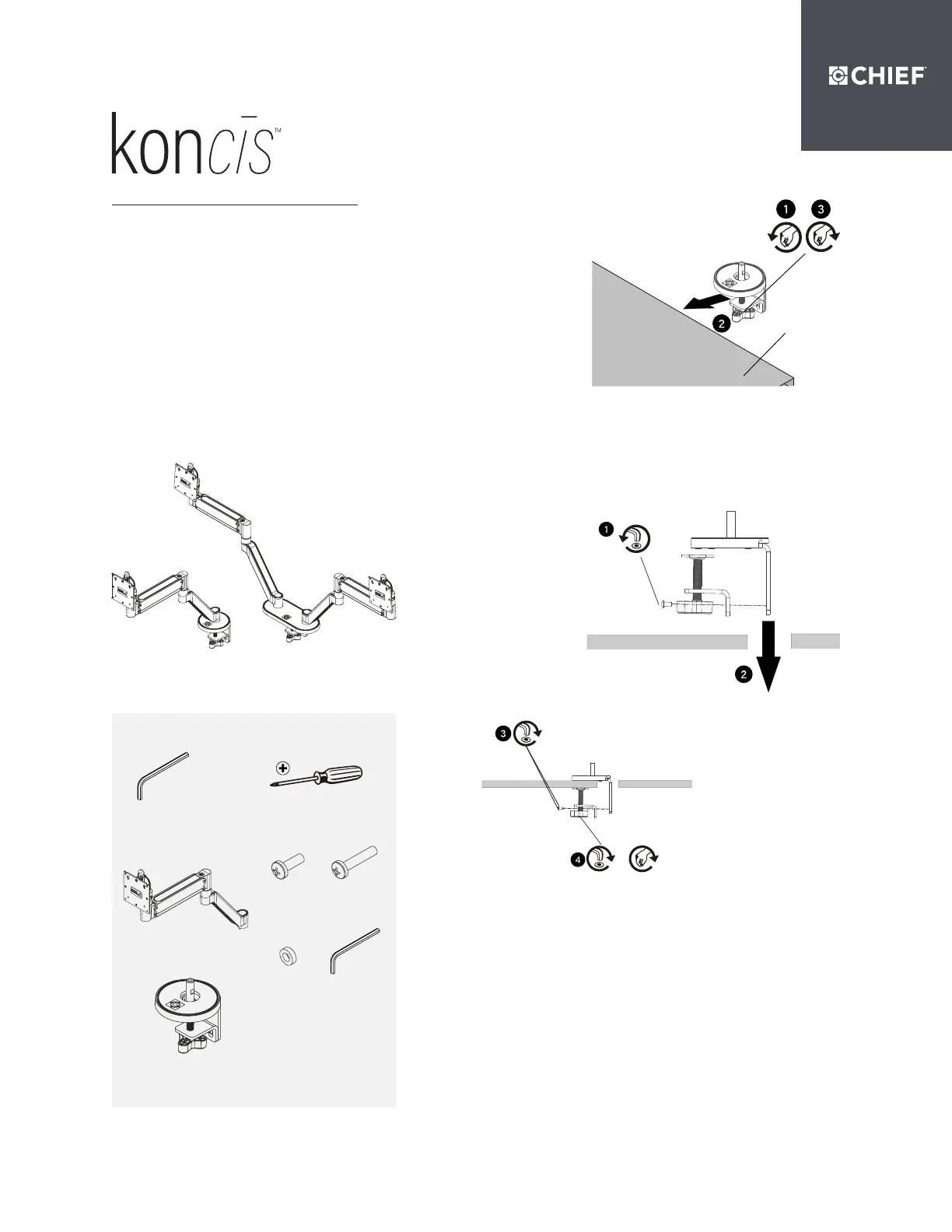
Option A
Step 1: Clamp Base to Desk Edge Option
Loosen clamp screw on base, place on desk
and tighten.
Reattach removed piece of clamp and
screws and tighten clamp screw.
8800-003249, Rev00 10/2020
Option B
Step 1: Clamp Base through Grommet Hole Option
Remove lower piece of clamp from assembly by removing two
button head cap screws and install remaining part of clamp
through grommet hole.
DMA1 Single Monitor Arm
DMA2 Dual Monitor Arm
Tools Required for Installation
Parts
#2
5/32” (included)
A (1)
[Arm assembly]
(DMA1 shown)
B (1)
[Base assembly]
(DMA1 shown)
F (1)
5/32”
D (4/8)*
M4 x 20mm
E (4/8)*
M10 x 5.3 x 10
C (4/8)*
M4 x 10mm
DISCLAIMER
Legrand | AV and its ailiated corporations and subsidiaries (collectively “Legrand | AV”), intend
to make this manual accurate and complete. However, Legrand | AV makes no claim that the
information contained herein covers all details, conditions or variations, nor does it provide
for every possible contingency in connection with the installation or use of this product. The
information contained in this document is subject to change without notice or obligation of any
kind. Legrand | AV makes no representation of warranty, expressed or implied, regarding the
information contained herein. Legrand | AV assumes no responsibility for accuracy, completeness
or suiciency of the information contained in this document.
WEIGHT CAPACITY WARNING
Exceeding the weight capacity can result in serious personal injury or damage to equipment! It is
the installer’s responsibility to make sure the combined weight of all components and accessories
attached to the DMA Series Monitor Arm up to (and including) the display is between the weight
ranges listed below. Use with products heavier than the maximum weight indicated may result in
collapse of the mount and its accessories causing possible injury. Use with products lighter than
the minimum weight indicated may result in the mount not functioning properly.
Probleemoplossing Chief DMA2B
Als je de handleiding al zorgvuldig hebt gelezen maar geen oplossing voor je probleem hebt gevonden, vraag dan andere gebruikers om hulp
Specificaties
| Kleur van het product: | Zwart |
| In hoogte verstelbaar: | Ja |
| Montagewijze: | Bureau |
| Maximale gewichtscapaciteit: | 6.8 kg |
| Model: | Landschap/portret |
| Aantal per verpakking: | 1 stuk(s) |
| Gemakkelijk te installeren: | Ja |
| Montage interface compatibiliteit (min): | 75 x 75 mm |
| Montage interface compatibiliteit (max): | 100 x 100 mm |
| Aantal displays ondersteund: | 2 |
| Bereik kantelhoek: | -10 - 65 ° |
| Maximale schermgrootte: | 32 " |
| Code geharmoniseerd systeem (HS): | 85299097 |
| Minimale schermgrootte: | - " |
| Type hoogteverstelling: | Handmatig |
| kantel aanpassingen: | Ja |
| Bureaubladdikte (max): | 63 mm |
| Bureaubladdikte (min): | 13 mm |