Chief
Flat panel steun
PSM2536
Chief PSM2536 Handleiding
Hier is de Chief PSM2536 (Flat panel steun) gebruikershandleiding. 2 pagina's in taal Engels met een gewicht van 0.2 Mb. Als u geen antwoorden op uw probleem kunt vinden Vraag het onze community.
Pagina 1/2
I N S T A L L A T I O N I N S T R U C T I O N S
CHIEF MANUFACTURING INC. 8805-000131 REV. B
1-800-582-6480 952-894-6280 FAX 952-894-6918 2005 Chief Manufacturing
8401 EAGLE CREEK PARKWAY, STE 700 www.chiefmfg.com
SAVAGE, MINNESOTA 55378 USA 05/05
DISPLAY STATIC MOUNT
PSM-2534 & 2536
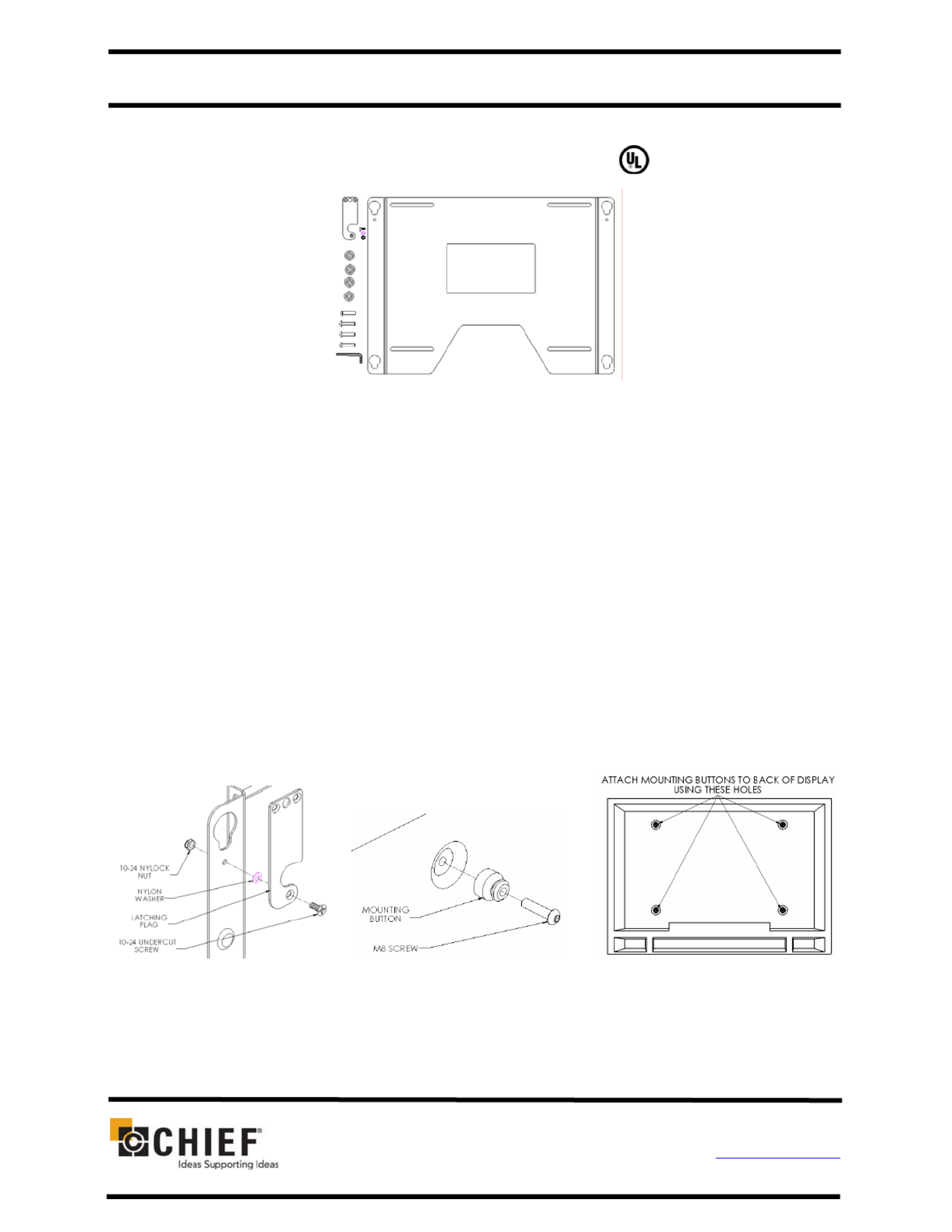
(1) Static Mount (1) 10-24 x .5 Phillips Undercut Screw
(1) Latching Flag (1) Nylon Washer
(4) M8 X 35mm Button Head Cap Screw (1) 10-24 Nylock Nut
(4) Mounting Buttons – Black Nylon (1) M5 Allen Key
BEFORE PROCEEDING: Unpack the carton, verify contents shown in Figure 1 and read
installation instructions completely. If you are missing any of the listed components, please
contact Customer Service at 1-800/582-6480.
Displays are Extremely Fragile.
1. Attach latching flag to mount using the 10-24 screw, Nylon washer, and Nylock nut (see
Figure 2). Tighten until friction will hold the flag in place.
2. Attach mounting buttons to the display using the M8 screws provided (see Figure 3 &
Figure 4).
CAUTION!
Figure 2
Figure 1
Figure 4 Figure 3
Probleemoplossing Chief PSM2536
Als je de handleiding al zorgvuldig hebt gelezen maar geen oplossing voor je probleem hebt gevonden, vraag dan andere gebruikers om hulp
Specificaties
| Kleur van het product: | Zwart |
| Montagewijze: | Muur |
| Geschikt voor schermmaten: | 16 - 65 " |
| Maximale gewichtscapaciteit: | 79.38 kg |