Defender Z9 Handleiding
Hier is de Defender Z9 (Soundbar) gebruikershandleiding. 8 pagina's in taal met een gewicht van 3,323,900.0 Mb. Als u geen antwoorden op uw probleem kunt vinden Vraag het onze community.
Pagina 1/8
Z9
Operation manual
Sound bar
1.
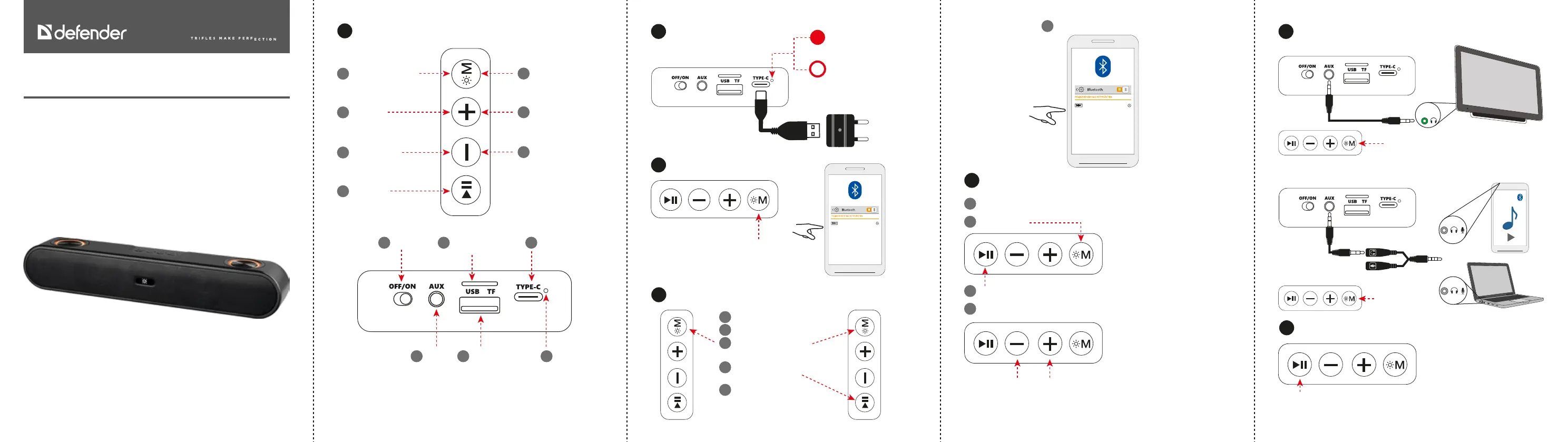
Functions
CLICK LONG PRESS
Сhange mode:
Bluetooth, MP3, AUX
1
Change the backlight
mode (to turn o the
backlight, press 10 times)*
1
Next track
2
Volume+
2
Play\Pause
4
Volume-
3
Previous track
3
On/O
1
Charging
Type-C 5V
3
TF card (sold
separately) -
insert till it clicks**
2
AUX
4
Charging
indicator
6
USB ash drive
(sold separately)**
5
*When the speaker is operating with a backlight, there may be a slight background sound
that can be heard in absolute silence; if it bothers you, turn o the backlight
**USB ash drive and TF drive must be up to 16GB in size and formatted in FAT32 system
2.
Charging
4.
Using two Enjoy Z9 at the same time (TWS mode)
5.
FM radio
6.
AUX playback
7.
Phone call
3.
Bluetooth connecton
USB charger
is sold separately
Type C 5V
230V
Charging
Charged
Select Bluetooth mode
Z9
Turn o Bluetooth on your phone
Turn on the both speakers
Select Bluetooth mode on
both speakers
Long press 3 seconds, you
will hear prompt sound
for searching TWS
You will hear prompt
sound as TWS connected
Turn Bluetooth on the phone
1
2
3
4
5
Z9
Connect the Type-C or AUX cable (this is antenna)
1
Select FM mode
2
Long press - start auto searching
3
Wait 2-3 min
ATTENTION: if the TV does not have a headphone output, you cannot connect a speaker to it!
Click - previous/next station
4
Select AUX mode
Click - answer/nish call
Refuse call - long press
Connecting to a TV
Wired connection to a laptop or smartphone
Select AUX mode
2 TRS (F) - TRRS (M) adapter,
sold separately
6
Probleemoplossing Defender Z9
Als je de handleiding al zorgvuldig hebt gelezen maar geen oplossing voor je probleem hebt gevonden, vraag dan andere gebruikers om hulp
Specificaties
| Merk: | Defender |
| Categorie: | Soundbar |
| Model: | Z9 |