Fantech TANTO S WG13S Handleiding
Hier is de Fantech TANTO S WG13S (Muis) gebruikershandleiding. 2 pagina's in taal met een gewicht van 822,717.0 Mb. Als u geen antwoorden op uw probleem kunt vinden Vraag het onze community.
Pagina 1/2
Join the Fantech
Discord
Community
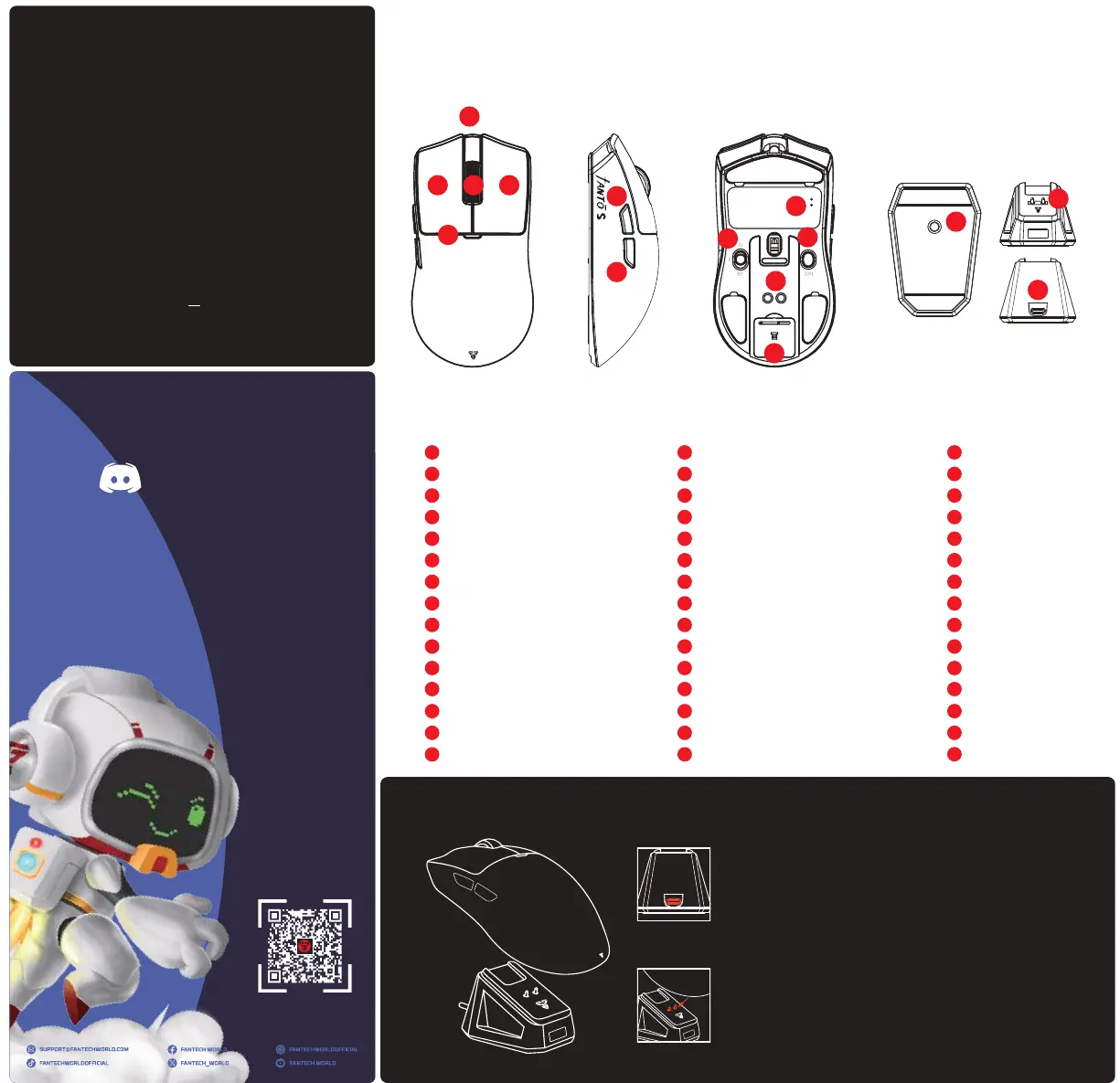
PRODUCT TOUR
USB-C Port
Left Button
Right Button
Scroll Wheel
DPI Indicator
Forward Button
Backward Button
Connection Switch
DPI Button
Dongle Slot
LED Indicator
Pogo Pin Contacts
RGB Switch
Pogo Pin Charger
USB-C Port
EN
A
E
C
B
F
G
H
I
J
K
L
M
N
O
D
A
E
C
B
F
G
H
I
J
K
L
M
N
O
D
A
E
C
B
F
G
H
I
J
K
L
M
N
O
D
Port USB-C
Tombol Kiri
Tombol Kanan
Roda Gulir
DPI Indikator
Tombol Maju
Tombol Mundur
Sakelar Koneksi
Tombol DPI
Slot Dongle
Lampu Indikator
Kontak Pogo Pin
Sakelar RGB
Pengisi Daya Pogo Pin
Port USB-C
ID
USB-C 接口
左键
右键
滚轮
DPI 指示灯
前进侧键
后退侧键
连接开关
DPI 按键
接收器插槽
连接指示灯
弹簧针触点
RGB 开关
弹簧针充电器
USB-C 接口
ZH
SPECIFICATIONS
C
A
B
D
E
G
F
Model Number
Connectivity
BT Version
Switch Lifetime
Sensor
Polling Rate
Speed (Max)
Acceleration (Max)
DPI (Max)
Default DPI
Battery Capacity
Battery Life
Dimension
Weight
Power Rating
Compatibility
: WG13S
: BT, Wired, StrikeSpeed PRO
: 5.0
: 100 Million Clicks
: PixArt PAW3395
: Wired 8000 Hz, Wireless 8000 Hz
: 650 IPS
: 50 G
: 26000
: 400-800-[1200]-1600-3200-26000
: 300 mAh Li-ion
: Up to 44 Hours
: 122*64*36.5 mm
: 58 ± 2 g
: 3.3V --- 25mA
: Windows® 7 or later & Mac®
OS 10.11 or later
H
K
I
J
L
M
N
O
2. Align the Pogo Pin Contacts with the Pogo Pin Charger on
the dock. Ensure proper positioning for the metal contacts
to connect and start charging.
1. To charge the mouse using charging dock, plug-in the
USB-C cable to the USB-C port.
CHARGING DOCK
Probleemoplossing Fantech TANTO S WG13S
Als je de handleiding al zorgvuldig hebt gelezen maar geen oplossing voor je probleem hebt gevonden, vraag dan andere gebruikers om hulp
Specificaties
| Merk: | Fantech |
| Categorie: | Muis |
| Model: | TANTO S WG13S |