Garmin echoMAP Plus 45cv Handleiding
Hier is de Garmin echoMAP Plus 45cv (Navigator) gebruikershandleiding. 3 pagina's in taal Engels met een gewicht van 0.6 Mb. Als u geen antwoorden op uw probleem kunt vinden Vraag het onze community.
Pagina 1/3
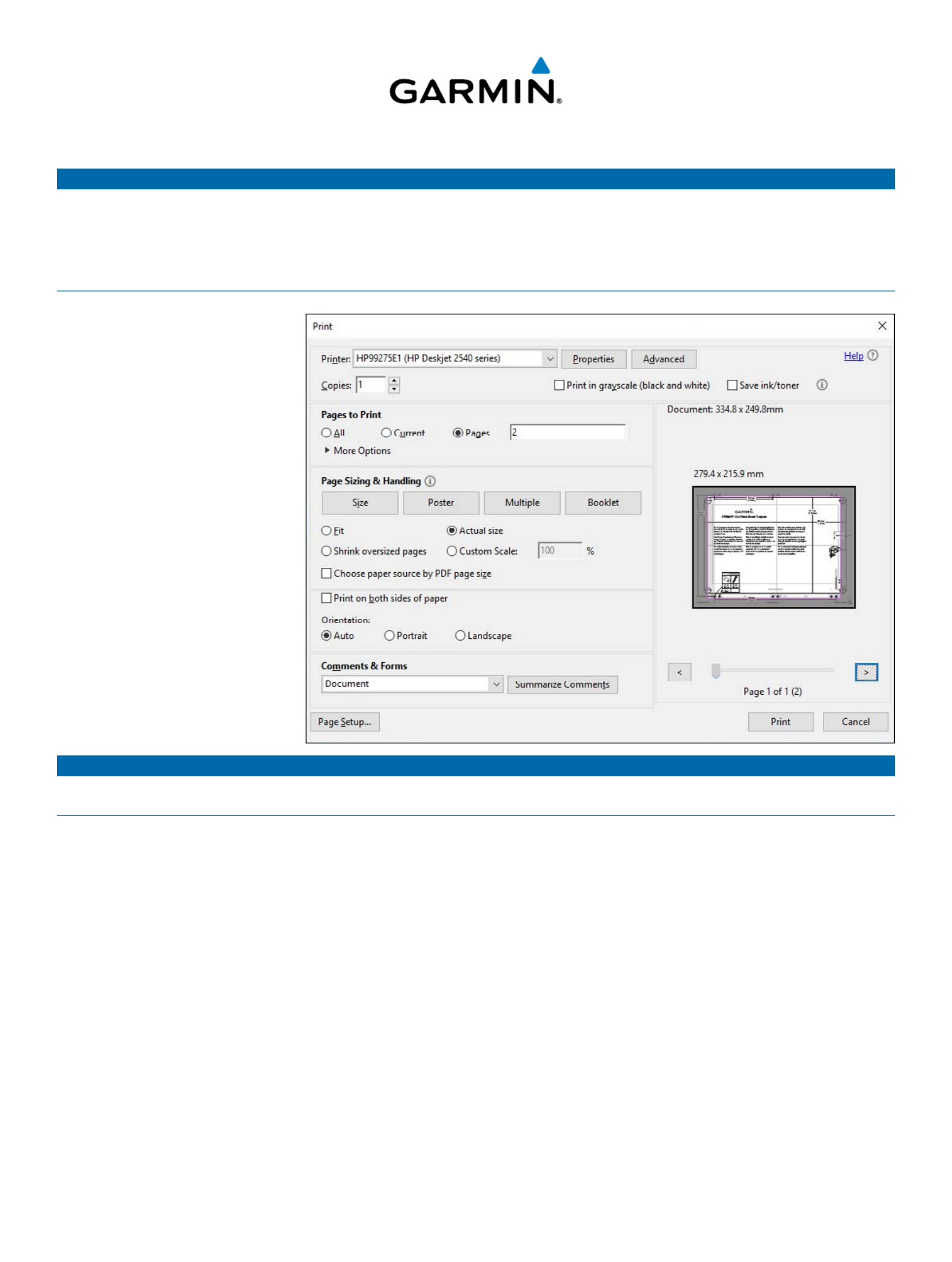
Printing a Mounting Template
NOTICE
It is not recommended that you print a mounting template on your own. Use the template that came in the product box.
If you do print the template, you must follow these instructions for printing a mounting template precisely. To print large templates,
you need large enough paper and printer. Failure to have the correct sized paper and printer, or a failure to follow these instructions,
may result in an incorrectly sized template and therefore an incorrect cutout (too large or too small) on the mounting surface of your
boat.
1 Select > .File Print
2 Enter in 2 Pages to Print ➊
➊
➊
➊➊.
2 Select Actual Size ➋
➋
➋
➋➋
for Page
Sizing & Handling.
3 Drag the arrow ➌
➌
➌
➌➌
to the right, to
view page 2 in the window above
➍
➍
➍
➍➍.
4 Verify that the paper size is larger
than the template ➍
➍
➍
➍➍.
In this example, the paper is not
larger than the template.
5 If the paper size is not large
enough, select Properties ➎
➎
➎
➎➎ and
select a that is larger Paper Size
than the template.
6 After printing the template,
measure at least one
measurement to ensure the
template printed to 100% scale.
NOTICE
Garmin is not responsible for any damages or expenses resulting from a miscut mounting surface arising from a failure to follow
these instructions.
➋
➋
➋
➋➋
➌
➌
➌
➌➌
➎
➎
➎
➎➎
➊
➊
➊
➊➊
➍
➍
➍
➍➍
Probleemoplossing Garmin echoMAP Plus 45cv
Als je de handleiding al zorgvuldig hebt gelezen maar geen oplossing voor je probleem hebt gevonden, vraag dan andere gebruikers om hulp
Specificaties
| Merk: | Garmin |
| Categorie: | Navigator |
| Model: | echoMAP Plus 45cv |