Garmin
Smartwatch
Forerunner 15 HR
Garmin Forerunner 15 HR Handleiding
Hier is de Garmin Forerunner 15 HR (Smartwatch) gebruikershandleiding. 8 pagina's in taal Engels met een gewicht van 1,571,390.0 Mb. Als u geen antwoorden op uw probleem kunt vinden Vraag het onze community.
Pagina 1/8
Forerunner
®
15 Owner's Manual
WARNING
See the guide in the Important Safety and Product Information
product box for product warnings and other important
information.
Always consult your physician before you begin or modify any
exercise program.
Getting Started
When using your device for the first time, you should complete
these tasks to set up the device and learn about the basic
features.
1
Charge the device ( ).Charging the Device
2
Turn on activity tracking ( ).Turning On Activity Tracking
3
Put on the optional heart rate monitor (Putting On the Heart
Rate Monitor).
4
Go for a run ( ).Going For a Run
5
Upload your run to the Garmin Connect™ site (Using Garmin
Connect).
6
Get more information ( ).Getting More Information
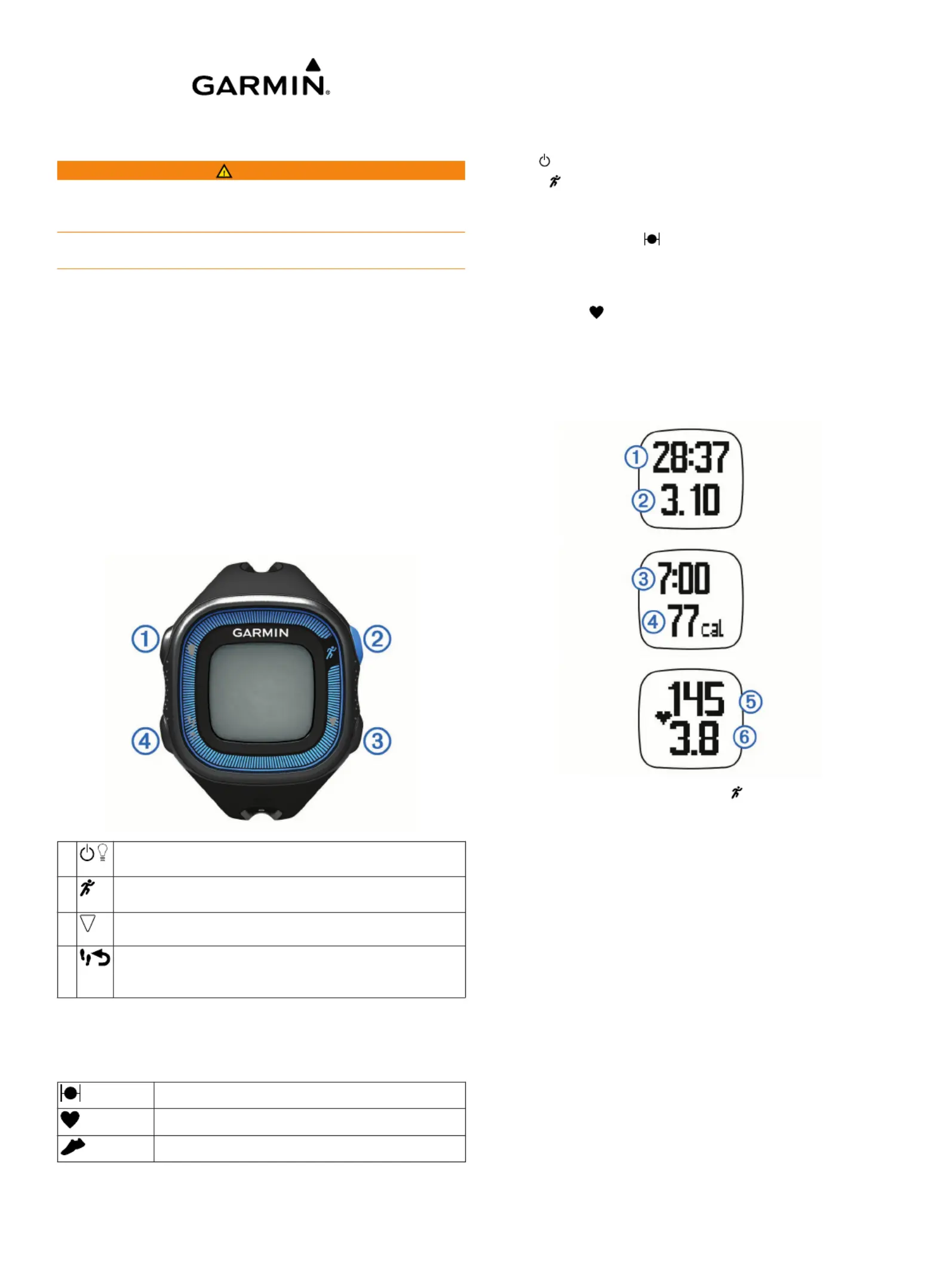
Keys
À
Select to turn the backlight on and off.
Hold to turn the device on and off.
Á
Select to start and stop the timer.
Select to choose the highlighted menu item.
Â
Select to scroll through the data screens, options, and
settings.
Ã
Select to scroll through activity tracking data.
Select to mark a new lap.
Select to return to the previous screen.
Status Icons
A flashing icon means the device is searching for a signal. A
solid icon means the signal was found or the sensor is
connected.
GPS status
Heart rate status
Foot pod status
Going For a Run
The device comes partially charged. You may need to charge
the device ( ) before going for a run.Charging the Device
1
Put on the optional heart rate monitor (Putting On the Heart
Rate Monitor).
2
Hold to turn on the device.
3
Select .
4
Go outside, and wait while the device locates satellites.
It may take a few minutes to locate satellite signals. When
satellites are located, displays solid.
5
When using a heart rate monitor, wait while the device
connects to the sensor.
When the device detects the heart rate monitor, a message
appears and displays solid.
6
Select to start the timer.Start
7
Go for a run.
Time
À
, distance
Á
, pace
Â
, calories burned
Ã
, beats per
minute
Ä
, and heart rate zone
Å
are recorded while the
timer is running.
8
After you complete your run, select to stop the timer.
9
Select an option:
• Select to restart the timer.Resume
NOTE: After a few seconds, a summary appears.
• Select to save the run and reset the timer. A Save
summary appears.
NOTE: You can now upload your run to Garmin Connect
( ).Using Garmin Connect
• Select to delete the run.Discard
Garmin Connect
You can connect with your friends on Garmin Connect. Garmin
Connect gives you the tools to track, analyze, share, and
encourage each other. Record the events of your active lifestyle
including runs, walks, rides, swims, hikes, triathlons, and more.
To sign up for a free account, go to www.garminconnect.com
/start.
Store your activities: After you complete and save an activity
with your device, you can upload that activity to Garmin
Connect and keep it as long as you want.
Analyze your data: You can view more detailed information
about your activity, including time, distance, heart rate,
September 2014
Printed in Taiwan 190-01727-00_0C
Probleemoplossing Garmin Forerunner 15 HR
Als je de handleiding al zorgvuldig hebt gelezen maar geen oplossing voor je probleem hebt gevonden, vraag dan andere gebruikers om hulp
Specificaties
| Merk: | Garmin |
| Categorie: | Smartwatch |
| Model: | Forerunner 15 HR |