GeoVision
Netwerkkaart/adapter
GV-PA482
GeoVision GV-PA482 Handleiding
Hier is de GeoVision GV-PA482 (Netwerkkaart/adapter) gebruikershandleiding. 2 pagina's in taal Engels met een gewicht van 0.2 Mb. Als u geen antwoorden op uw probleem kunt vinden Vraag het onze community.
Pagina 1/2
January 25, 2019
1
GV-PA482 PoE Adapter
The GV-PA482 is a Power over Ethernet (PoE) adapter designed to provide power to the IP
camera through a single Ethernet cable. Adopting the PoE adapter enables you to mount an
IP camera anywhere in a building where power outlets are not available.
Packing List
1. GV-PA482 PoE Adapter x 1
2. Power Adapter (DC 48V, 2.5A, 120 W)
Connections
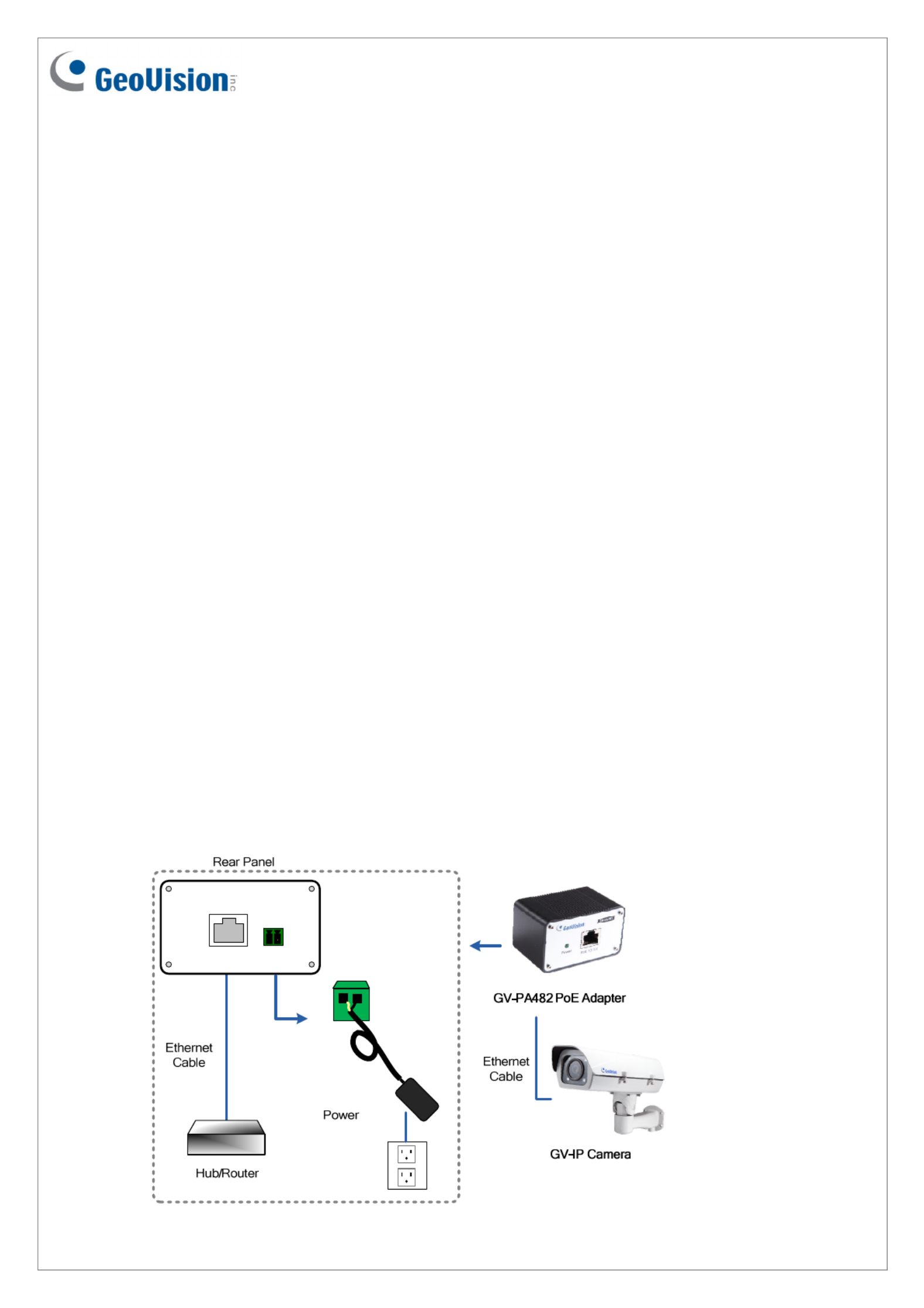
Two Ethernet cables are required for the connection.
1. Connect one end of the first Ethernet cable into the PoE 10/100 port on the GV-PA482,
and the other end to your camera.
2. Connect one end of the second Ethernet cable into the LAN 10/100 port on the GV-
PA482, and the other end to the hub or router connecting to your computer.
3. Insert the white wire of the supplied DC power adapter left-side pin of the terminal block
on the GV-PA482, and the black wire to the right-side pin.
LAN 10/100 Power IN
Probleemoplossing GeoVision GV-PA482
Als je de handleiding al zorgvuldig hebt gelezen maar geen oplossing voor je probleem hebt gevonden, vraag dan andere gebruikers om hulp
Specificaties
| Gewicht: | 130 g |
| Breedte: | 69 mm |
| Diepte: | 43 mm |
| Hoogte: | 40 mm |
| AC-adapter ingangsspanning: | 100 - 240 V |
| Stroom: | 2.5 A |
| Aantal Ethernet LAN (RJ-45)-poorten: | 1 |
| Plug and play: | Ja |
| Ethernet LAN, data-overdrachtsnelheden: | 10, 100 Mbit/s |
| Bekabelingstechnologie: | 10/100 |
| Uitgangsvermogen: | 120 W |
| Ethernet interface type: | Fast Ethernet |
| Power over Ethernet (PoE): | Ja |
| Maximale afstand: | 100 m |
| Bedrijfstemperatuur (T-T): | -10 - 50 °C |
| Aantal producten inbegrepen: | 1 stuk(s) |
| Ondersteundende kabel types: | Cat5e |
| Stroom via Ethernet (PoE): | 48 V |