Jetson
Zelfbalancerende scooter
MotoKicks
Jetson MotoKicks Handleiding
Hier is de Jetson MotoKicks (Zelfbalancerende scooter) gebruikershandleiding. 2 pagina's in taal met een gewicht van 2,648,050.0 Mb. Als u geen antwoorden op uw probleem kunt vinden Vraag het onze community.
Pagina 1/2
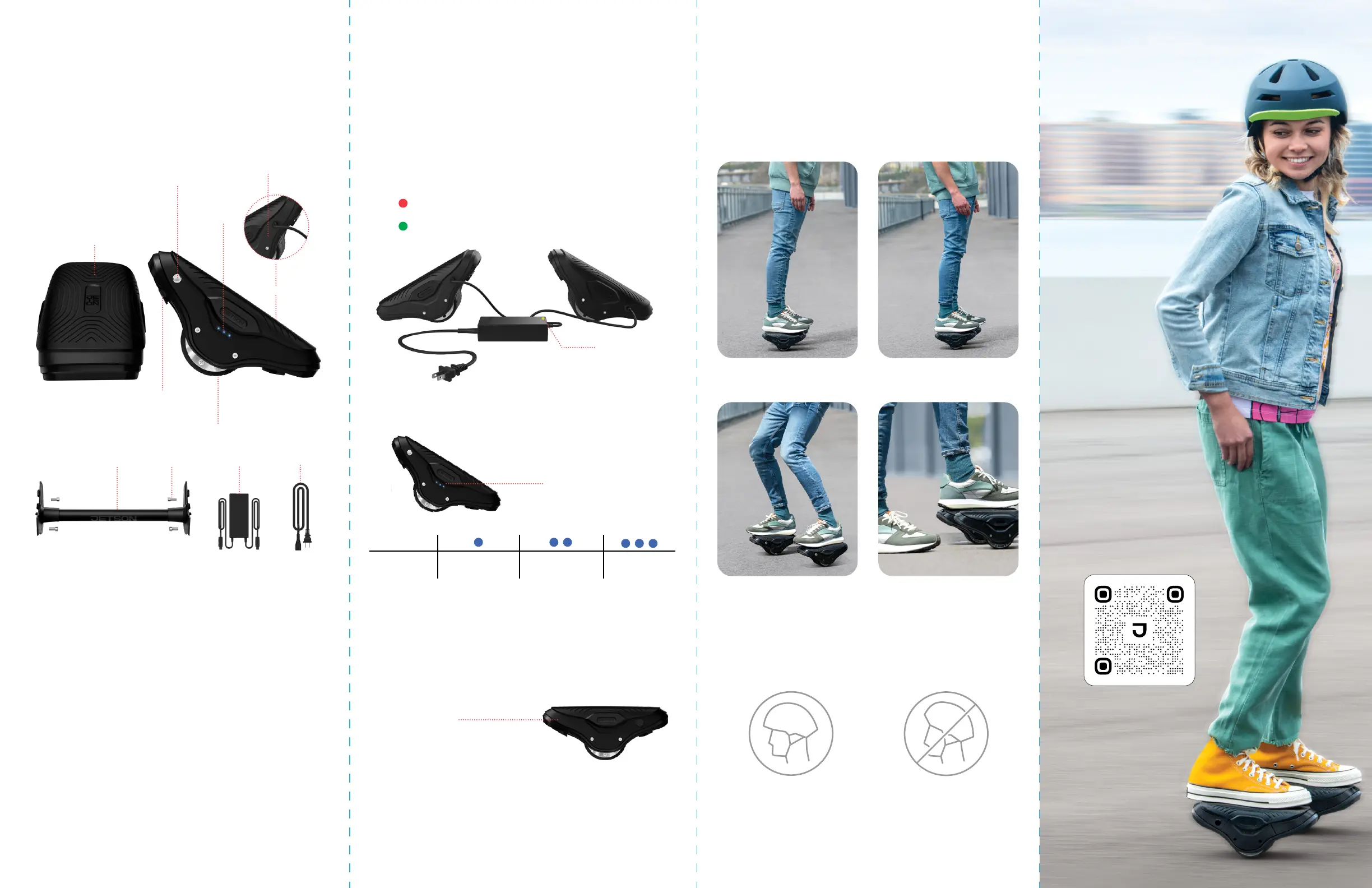
Product Overview
Charging your MotoKicks
Getting Started
Battery Indicator Lights
How to Recalibrate
Specs & Features
a. Power Button
b. Mat Sensor
c. Carrying Handle
d. Battery Indicator Lights
e. Charging Port
f. Wheel
g. Training Bar
h. Training Bar Screws (x4)
i. Side Plate
j. Charger
k. Charging Cable
(On opposite side)
Please Note: Images may not relect exact appearance of actual product.
Note: it can take up to 3 recalibration attempts to achieve proper internal alignment.
* Keep the MotoKicks leveled and still throughout the recalibration process.
While recalibrating, do not lean on or put any weight on the MotoKicks.
• Product Dimensions: 10.6” (L) × 5.5” (W) × 4.5” (H) (Each)
• Weight Limit: 220 lbs
• Product Weight: 6.0 lbs (Each)
• Wheel Size: 3.5”
• Max Speed: 7 mph
• Max Range: 6 miles
• Battery: 25.9V, 1.9Ah Lithium-Ion (Each)
• Motor: 250W Hub Motor (Each)
• Charger: 100-240V
• Charging Time: Up to 3 Hours
• Climbing Angle: Up to 10°
• Recommended Age: 13+
• Only use the included charger.
• Plug the charger into the wall before the charging port.
• Never turn on the MotoKicks while they are charging.
• Charge the battery until it is fully charged before using — up to 3 hours.
• Replace the cover over the charging port when done.
• Never leave the MotoKicks charging overnight.
• Charger Indicator Light:
If you can ride a hoverboard, you can ride Jetson MotoKicks.
- Charging
- Charge Complete
Battery Indicator Lights
Charger Indicator Light
Power Button
Important: As a safety precaution, Motokicks will automatically turn off
when they battery charge level goes below 10%.
Follow these 3 simple steps:
1. Turn the MotoKicks off and place them on a lat, level surface.
2. Hold each Power Button for about 5 seconds until the lights
lash and the MotoKicks beep.
3. Restart the MotoKicks by turning them off and then back on.
1. Lean slightly forward to move
forward. You got this!
2. Lean slightly backward to move
in reverse or brake.
3. Turn by leaning to the side as
you ride. Way to go!
4. Step o when the MotoKicks are
at complete stop. Just step back-
wards one foot at a time.
Great riding!
Lights
> 20% 20-30%
30% +
Charge
Percentage
a.
i.
d.
e.
c.
f.
j. k.
b.
h.g.
How it Works
Riding your MotoKicks
Helmet Safety
• Power On: Place on level ground, then turn on each MotoKick by
quick-pressing the Power Button.
• Balance Mode: Gently tilt both MotoKicks and they will self-stabilize.
Master your
MotoKicks!
Scan this for
more riding tips.
Improper positioning:
The forehead is exposed.
A fall could result in serious injury.
Proper positioning:
The forehead is covered
by the helmet.
* Wear a helmet, appropriate clothing, shoes, and safety gear. Avoid clothing
that can get caught into or under the wheels. Closed-toe, lat shoes are
recommended. Wear an ASTM F1492 approved helmet and protective gear to
prevent injury in the event of an accident.
If your Motokicks are not performing as they should, are beeping or
spinning, or feel o balance, their internal balance mechanisms need to
be realigned. This is called “recalibrating.”
Probleemoplossing Jetson MotoKicks
Als je de handleiding al zorgvuldig hebt gelezen maar geen oplossing voor je probleem hebt gevonden, vraag dan andere gebruikers om hulp
Specificaties
| Merk: | Jetson |
| Categorie: | Zelfbalancerende scooter |
| Model: | MotoKicks |