Lenovo 3000 C100 Handleiding
Hier is de Lenovo 3000 C100 (Laptop) gebruikershandleiding. 2 pagina's in taal Engels met een gewicht van 0.5 Mb. Als u geen antwoorden op uw probleem kunt vinden Vraag het onze community.
Pagina 1/2
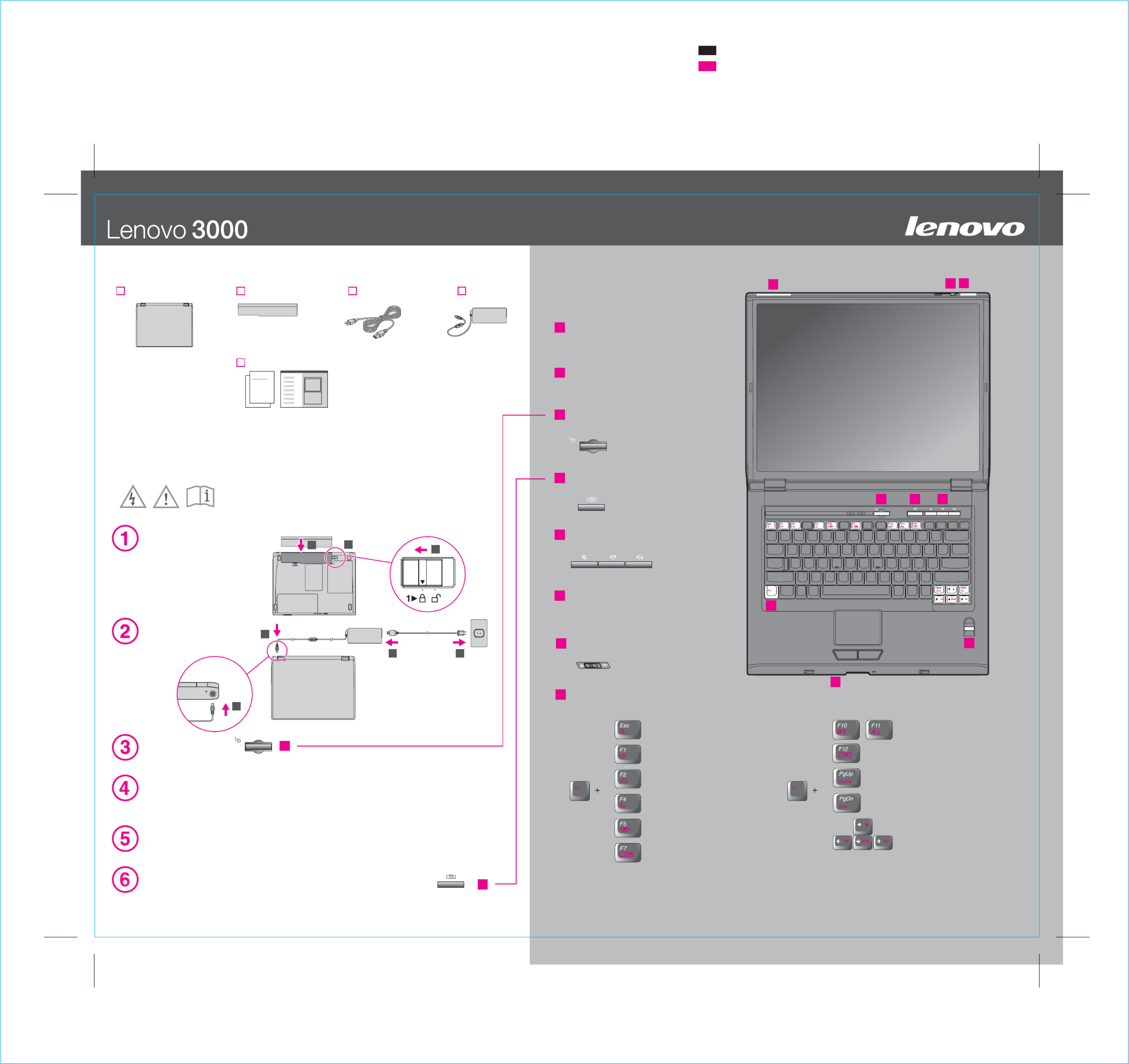
Lenovo 3000 C Series Setup Poster
P/N
7/13/2006
Size : 11x14 inches
Color : 2 color job =
Font : IBM Fonts and Helvetica Neue Family
Material : 100 gsm gloss art paper (Us apan. )e 100% recycled paper in only J
Blue line shows die-cut. DO NOT PRINT.
Please change the barcode No.
Please change the country name if the poster is printed in other than China.
Process Magenta (This plate must be printed in PMS 1375C)
Process Black (This plate must be printed in PMS Process Black C)
1
2
3
4
5
6
3
4
1
2 3
1
7
12
2
8
3
2
7
6
54
8
11
P/N:41W7909
Install battery pack:
Your battery is ready to use.
Connect to power:
Turn on the power:
Point and click with touch pad:
This process takes several minutes, and your computer may restart multiple times.
Configure the Operating System following on-screen instructions:
Unpack
Move across the touch pad in the direction you want to move the pointer. The left and right
buttons below the space bar and touch pad function like mouse buttons.
For more detailed information, press the Lenovo Care(SM) button:
Change display brightness
Enter hibernation
Home
End
Multimedia controls
Mute
Volume Down
Volume Up
Enter standby
Manage network connections
Choose display scheme
Fn key
Use in combination with other keys to access special features
Wireless LAN antennas
One - handed latch
Power button
Lenovo Care button
Volume and mute buttons
Wireless radio switch
Fingerprint reader*
*Specific models only.
Power cord AC adapterBattery packLenovo 3000 computer
- Setup Instructions (this sheet)
- Other supplements or flyers
- Service and Troubleshooting Guide
Initial Setup Instructions
See reverse for notes about unlisted, missing, or damaged items and recovery CD.
Manuals
41W7909
- Safety and Warranty Guide
Read the safety notices and important tips in the included manuals
before using your computer.
Probleemoplossing Lenovo 3000 C100
Als je de handleiding al zorgvuldig hebt gelezen maar geen oplossing voor je probleem hebt gevonden, vraag dan andere gebruikers om hulp
Specificaties
| Gewicht: | 2860 g |
| Beeldscherm: | LCD |
| Beeldschermdiagonaal: | 15 " |
| Resolutie: | 1024 x 768 Pixels |
| Oorspronkelijke beeldverhouding: | 4:3 |
| Frequentie van processor: | 1.73 GHz |
| Inclusief besturingssysteem: | Windows XP Home Edition |
| Audiosysteem: | ALC250 |
| Aantal USB 2.0-poorten: | 4 |
| VGA (D-Sub)poort(en): | 1 |
| Microfoon, line-in ingang: | Ja |
| DVI-poort: | Nee |
| Aantal Ethernet LAN (RJ-45)-poorten: | 1 |
| Bevestigingsmogelijkheid voor kabelslot: | Ja |
| Kabelslot sleuf type: | IBM |
| Aantal ingebouwde luidsprekers: | 2 |
| Hoofdtelefoonuitgangen: | 1 |
| Intern geheugen: | 0.5 GB |
| Levensduur accu/batterij: | 5 uur |
| Intern geheugentype: | DDR2-SDRAM |
| Maximum intern geheugen: | 2 GB |
| Totale opslagcapaciteit: | 80 GB |
| Soort optische drive: | DVD-RW |
| Aparte grafische adapter: | Ja |
| Camera voorzijde: | Nee |
| Basisstationaansluiting: | Nee |
| SmartCard-slot: | Ja |
| Netwerkfuncties: | Ethernet/Fast Ethernet |
| Discreet grafische adapter model: | Intel® GMA 900 |
| Aanwijsapparaat: | ThinkPad UltraNav |
| Infrarood datapoort: | Nee |
| Chipset moederbord: | Intel® 915GM Express |
| HDD interface: | EIDE/ATA |
| HDD rotatiesnelheid: | 5400 RPM |
| Aantal IEEE 1394-/Firewire-poorten: | 1 |
| Modemsnelheid: | 56 Kbit/s |
| Front-side bus processor: | 533 MHz |
| Charging port type: | DC-in ingang |
| Type CardBus PCMCIA-slot: | Type II |
| Maximaal geheugen grafische adapter: | 0.128 GB |
| Intern modem: | Ja |
| Draadloze technologie: | IEEE 802.11a/IEEE 802.11b/IEEE 802.11g/Bluetooth |
| TV-in-poort: | Nee |
| TV-uit: | Ja |
| S/PDIF-uitgang: | Nee |
| Afmetingen (B x D x H): | 334 x 277.5 x 34 mm |
| Modem (RJ-11) poort: | 1 |
| Aantal CardBus PCMCIA-sloten: | 1 |
| Aantal batterijcellen: | 8 |
| Type tv-uitgang: | S-Video |
| Video-adapter, bus: | PCI Express |