Lenovo IdeaCentre 710 Handleiding
Hier is de Lenovo IdeaCentre 710 (Desktop) gebruikershandleiding. 2 pagina's in taal Engels met een gewicht van 1.0 Mb. Als u geen antwoorden op uw probleem kunt vinden Vraag het onze community.
Pagina 1/2
ideacentre
710 Series
Quick Start Guide
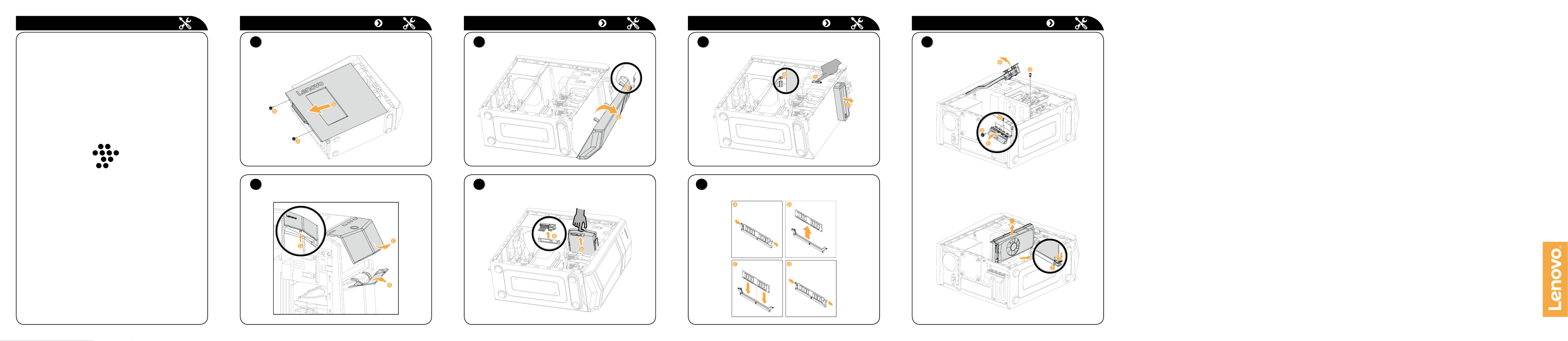
Replacing or upgrading hardware
Safety information for replacing CRUs
Do not open your computer or attempt any repairs before reading the “Important
safety information” in the Safety, Warranty, Environment, Recycling Information
Guide Important Product Information Guide and that was included with your
computer.
If you no longer have this copy of the Safety, Warranty, Environment, Recycling
Information Guide Important Product Information Guide and , you can obtain
one online from the website at http://www.lenovo.com/UserManuals.
Pre-disassembly instructions
Before proceeding with the disassembly procedure, make sure that you do the
following:
1. Turn off the power to the system and all peripherals.
2. Unplug all power and signal cables from the computer.
3. Place the system on a flat, stable surface.
This part contains instructions for replacing the following parts:
• Harddiskdrive(Followsteps:
1
4
)
• Opticaldrive(Followsteps:
1
2
3
5
)
• Memorymodule(Followsteps:
1
6
)
• Graphicscard(Followsteps:
1
7
)
Replacing or upgrading hardware Replacing or upgrading hardware
1
Removing the computer cover
3
Removing the front bezel
2
Removing the top cover
Replacing or upgrading hardware
4
Replacing a hard disk drive
5
Replacing an optical drive
Replacing or upgrading hardware
7
Replacing a graphics card
6
Replacing a memory module
g
Probleemoplossing Lenovo IdeaCentre 710
Als je de handleiding al zorgvuldig hebt gelezen maar geen oplossing voor je probleem hebt gevonden, vraag dan andere gebruikers om hulp
Specificaties
| Merk: | Lenovo |
| Categorie: | Desktop |
| Model: | IdeaCentre 710 |