LG
Niet gecategoriseerd
WP40NB30
LG WP40NB30 Handleiding
Hier is de LG WP40NB30 (Niet gecategoriseerd) gebruikershandleiding. 4 pagina's in taal met een gewicht van 673,455.0 Mb. Als u geen antwoorden op uw probleem kunt vinden Vraag het onze community.
Pagina 1/4
• Please pay attention to handling Electrostatic
Sensitive Devices, you may use anti-static
products such as wrist straps, heel straps, mats
to protect your body from electrostatic.
• Make sure you have a personal computer with
one or two open USB ports before connecting
the drive to your computer.
• Power for all other devices should be turn off
before attaching the cables.
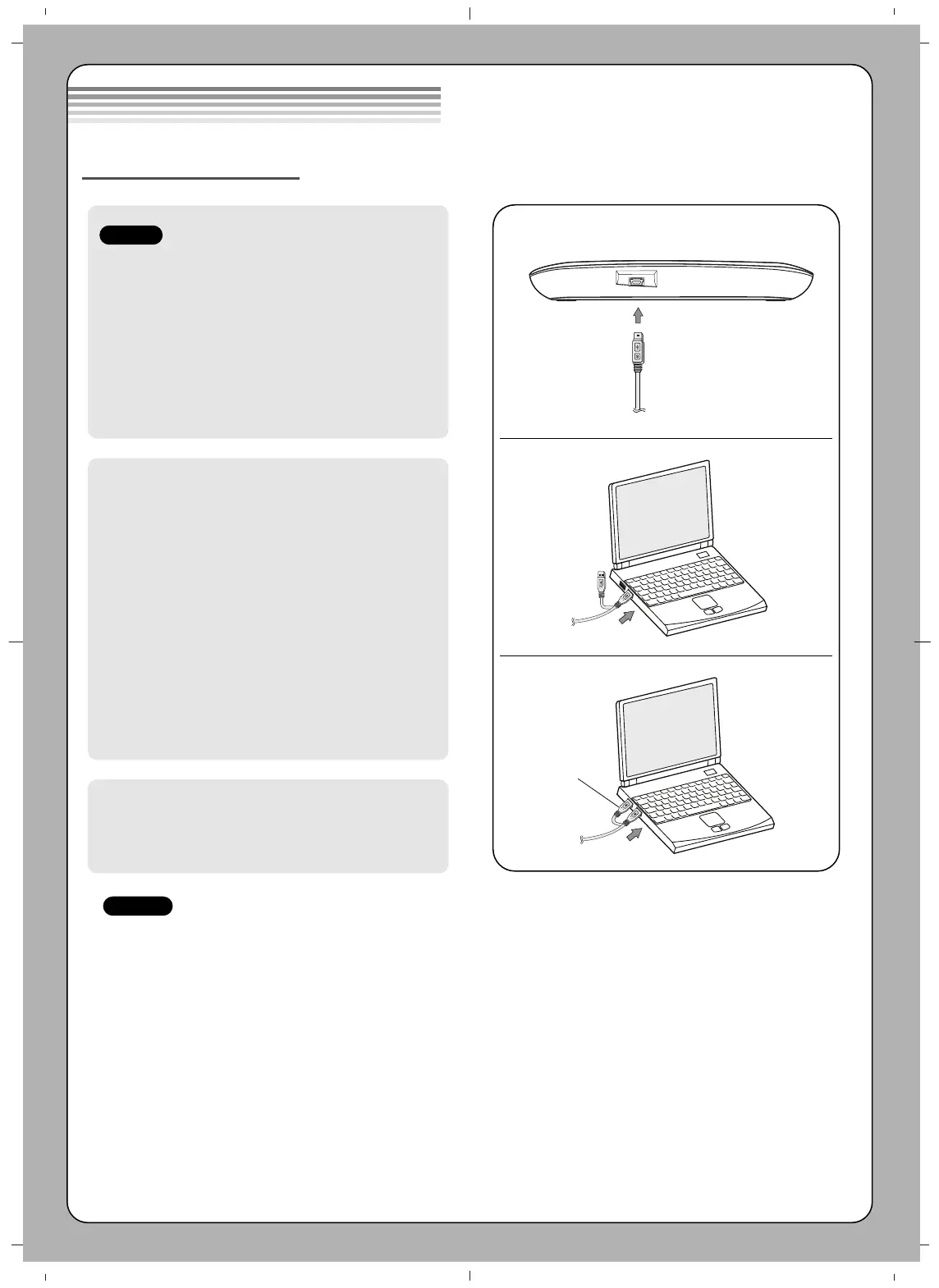
Connect the drive to the computer as shown in
figure.
1 Connect the USB 2.0 (Y type) cable to
the drive.
2 Connect the other end of the USB 2.0
cable to your computer.
3 The drive may get its power from the PC
USB power. All systems may not meet
USB power requirements and full
performance may not be achieved.
In this case, connect to the USB power
cable.
When the computer is ready, confirm that the
drive is detected. And then, insert the supplied
software CD into the drive and install the
software.
• Please do not connect the USB cables by any means other than specified above.
Using the wrong type of cable with this drive can cause it to malfunction.
• The appliance is not intended for use by young children or infirm persons without supervision.
Young Children should be supervised to ensure that they do not play with appliance.
• If the appliance is supplied from a cord extension set or an electrical portable outlet device, the cord
extension set on electrical portable outlet device must be positioned so that it is not subject to splashing
or ingress of moisture.
Installation
NOTES
Connecting to computer
Hardware Installation
NOTES
USB Power cable
1
2
3
Probleemoplossing LG WP40NB30
Als je de handleiding al zorgvuldig hebt gelezen maar geen oplossing voor je probleem hebt gevonden, vraag dan andere gebruikers om hulp
Specificaties
| Kleur van het product: | Zwart |
| Gewicht: | 325 g |
| Breedte: | 160 mm |
| Diepte: | 153 mm |
| Hoogte: | 22 mm |
| Aantal USB 2.0-poorten: | 1 |
| Interface: | USB 2.0 |
| Meegeleverde software: | Blu-ray Drive Install Disc for Windows, Power DVD 3D Edition, Power 2 Go, Power Producer, Media Espresso, Media Show, LG Firmware Update |
| Ondersteunt Windows: | Windows 7 Home Basic, Windows 8, Windows 8.1, Windows Vista Home Basic, Windows XP Home |
| Intern: | Nee |
| Soort optische drive: | Blu-Ray DVD Combo |
| Playback disc types: | BD-R, BD-R DL, BD-RE DL, BD-ROM, CD-R, CD-ROM, CD-RW, DVD+RW, DVD-R, DVD-R DL, DVD-RAM, DVD-ROM |
| Optische drive type: | BD-R, BD-R DL, BD-RE, BD-ROM, CD-DA, CD-R, CD-ROM, CD-RW, DVD, DVD+R, DVD+RW, DVD-R, DVD-RAM, DVD-ROM |
| Laadmechanisme: | Lade |
| Drive, omvang buffer: | 4 MB |
| Schrijfsnelheid CD: | 24 x |
| DVD+R schrijfsnelheid: | 8 x |
| DVD-R schrijfsnelheid: | 8 x |
| DVD-R Double Layer schrijfsnelheid: | 8 x |
| DVD+R Double Layer schrijfsnelheid: | 8 x |
| DVD-RW schrijfsnelheid: | 6 x |
| DVD+RW schrijfsnelheid: | 8 x |
| DVD-RAM schrijfsnelheid: | 5 x |
| Leessnelheid CD: | 24 x |
| DVD+R leessnelheid: | 8 x |
| DVD-R leessnelheid: | 8 x |
| DVD-ROM leessnelheid: | 8 x |
| DVD-R Double Layer leessnelheid: | 8 x |
| DVD+RW leessnelheid: | 8 x |
| CD-R schrijfsnelheid: | 24 x |
| CD-RW schrijfsnelheid: | 24 x |
| DVD+R Double Layer leessnelheid: | 8 x |
| DVD-RW leessnelheid: | 8 x |
| CD-R leessnelheid: | 24 x |
| CD-RW leessnelheid: | 24 x |
| DVD-RAM leessnelheid: | 5 x |
| CD-ROM leessnelheid: | 24 x |
| DVD gemiddelde random access time: | 200 ms |
| CD-ROM drive gemiddelde random access time: | 200 ms |
| BD-RE schrijfsnelheid: | 2 x |
| BD-R schrijfsnelheid: | 4 x |
| BD-R Dual Layer write speed: | 6 x |
| BD-ROM leessnelheid: | 6 x |
| BD-R leessnelheid: | 6 x |
| BD-RE leessnelheid: | 6 x |
| BD-R Dual Layer read speed: | 6 x |
| BD-RE Dual Layer leessnelheid: | 6 x |
| BD-RE: | 2 x |
| BD-RE Dual Layer write speed: | 2 x |
| BD-ROM gemiddelde random access time: | 230 ms |