Mikrotik
Schakelaar
GPEN11
Mikrotik GPEN11 Handleiding
Hier is de Mikrotik GPEN11 (Schakelaar) gebruikershandleiding. 5 pagina's in taal Engels met een gewicht van 745,068.0 Mb. Als u geen antwoorden op uw probleem kunt vinden Vraag het onze community.
Pagina 1/5
GPEN11
This device allows powering a PoE capable device over the Ethernet,
using the same voltage, as provided with the DC input jack.
Powering
The device accepts power from direct-input power jack (5.5 mm
outside and 2 mm inside, female, pin positive plug) 12-57 V DC⎓.
Power output
The device supports PoE out from Ethernet port located under the
cover. You can power Mikrotik devices which supports passive powering
through Ethernet.
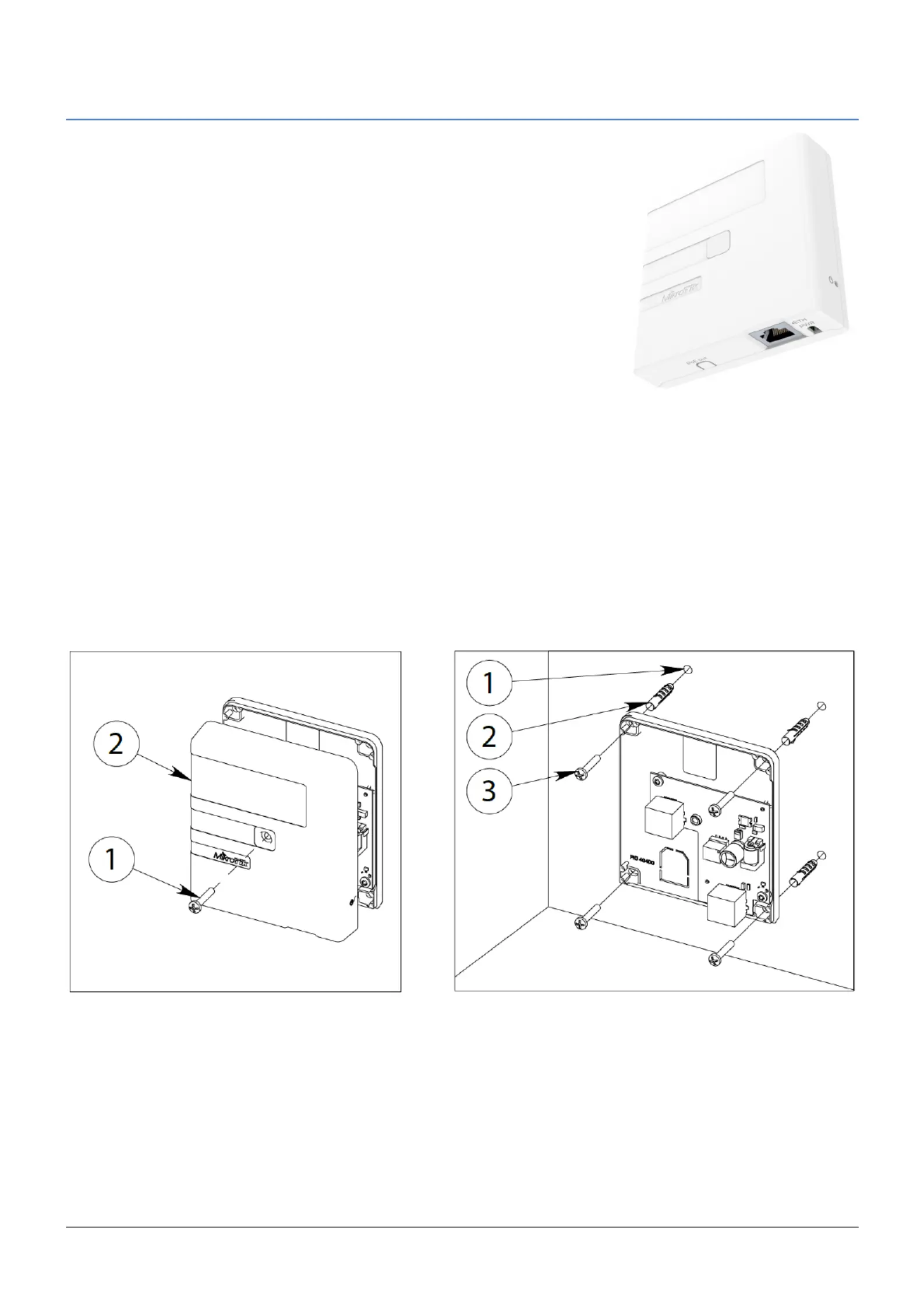
Mounting
Step 1:
1. Remove the cover screw using PH2 screwdriver;
2. Remove cover to access mounting points.
Step 2:
1. Drill holes using drill bid;
2. Insert dovels if needed;
3. Attach the unit to the wall, using wall and secure with screws.
Step 1. Step 2.
See mikrotik.com/products for the latest version of this document. Page 1, Document #46507 Modified on: 29.OCT.2019
Probleemoplossing Mikrotik GPEN11
Als je de handleiding al zorgvuldig hebt gelezen maar geen oplossing voor je probleem hebt gevonden, vraag dan andere gebruikers om hulp
Specificaties
| Kleur van het product: | Wit |
| Aantal Ethernet LAN (RJ-45)-poorten: | 2 |
| Aansluiting voor netstroomadapter: | Ja |
| Ingangsspanning: | 10 - 57 V |
| Ethernet LAN, data-overdrachtsnelheden: | 10,100,1000 Mbit/s |
| Ethernet interface type: | Gigabit Ethernet |
| Power over Ethernet (PoE): | Ja |
| Afmetingen (B x D x H): | 92 x 104 x 24 mm |
| Bedrijfstemperatuur (T-T): | -40 - 70 °C |
| Aantal producten inbegrepen: | 1 stuk(s) |
| Stroom via Ethernet (PoE): | - V |