Nedis
Afstandsbediening
TVRC20SNBK
Nedis TVRC20SNBK Handleiding
Hier is de Nedis TVRC20SNBK (Afstandsbediening) gebruikershandleiding. 68 pagina's in taal Nederlands met een gewicht van 4.6 Mb. Als u geen antwoorden op uw probleem kunt vinden Vraag het onze community.
Pagina 1/68
T V SAT
OK
VOL-
VOL+
P-
LEARN
0
7 8 9
4 5 6
123
2
3
0
11
9
4
6
8
7
5
12
TVRC20SNBK
Remote control
Description English
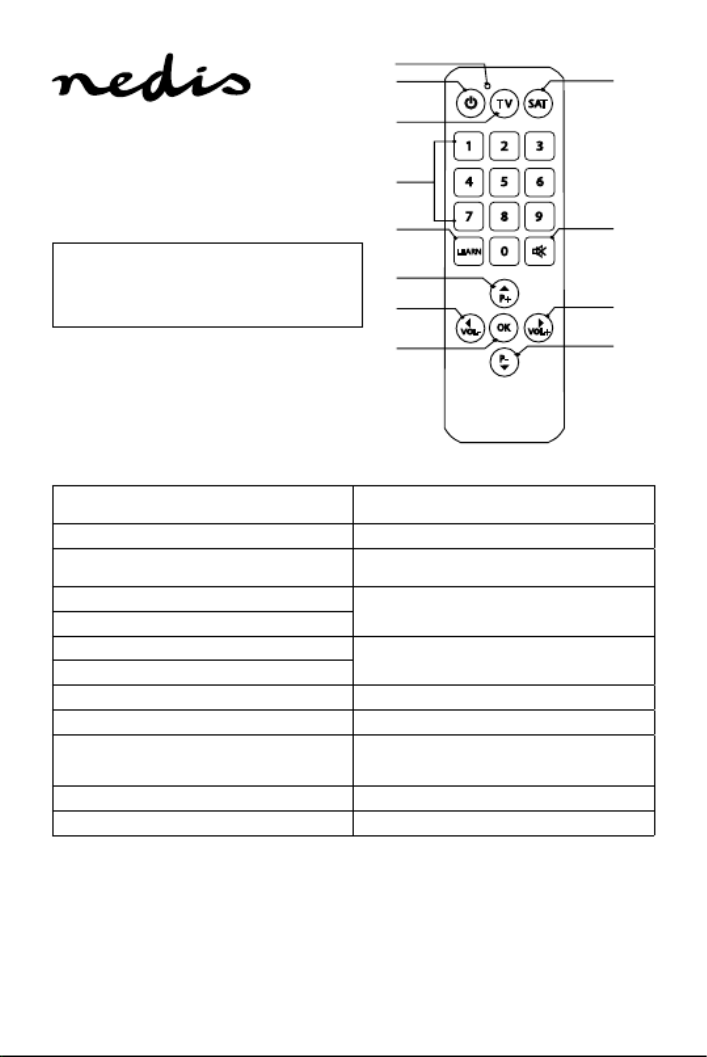
1. On/o button • Press the button to switch the TV on or o.
2. TV button • Press this button to control the TV.
3. Satellite button • Press this button to control the set-top-box or
other programmed devices.
4. Previous program button • Press the buttons to navigate through the
programs.
5. Next program button
6. Volume - button • Press the button to increase or decrease the
volume.
7. Volume + button
8. OK button • Press the button to conrm a selection.
9. Mute button • Press the button to mute the sound..
10. Learn button
• In learn mode, press the button to activate the
signal before copying functions from other
remote controls.
11. Digit buttons • Press the buttons to select the channel.
12. LED indicator • The LED indicator shows the status of the device.
Use
Programming the remote control to the TV or another device
1. Switch on the device to be programmed.
2. Look for the brand of the TV that you want to program in the code list. Make a note of the rst code in the list.
3. Press and hold the TV or satellite button of the remote control until the LED indicator comes on.
4. Enter the previously identied code.
Note: If the LED indicator goes o, it indicates that the code is accepted. If it switches on or o the TV, it indicates that the code is
correct. If it does not switch on or o the TV, repeat from step 2 to try another code.
Auto search
1. Switch on the device to be programmed.
2. Press and hold the tv or satellite button until the led indicator comes on
3. Point the remote control to the device. Press and slowly release the on/o button.
Note: If the device is switched o, it indicates that the code is found.
Specifications:
• Batteries:
2x AAA / LR03 (not incl.)
Probleemoplossing Nedis TVRC20SNBK
Als je de handleiding al zorgvuldig hebt gelezen maar geen oplossing voor je probleem hebt gevonden, vraag dan andere gebruikers om hulp
Specificaties
| Kleur van het product: | Zwart |
| Gewicht: | 160 g |
| Breedte: | 30 mm |
| Diepte: | 80 mm |
| Hoogte: | 250 mm |
| Materiaal behuizing: | Acrylonitrile butadiene styrene (ABS), Rubber |
| Aan/uitschakelaar: | Ja |
| Snelstartgids: | Ja |
| Accu/Batterij voltage: | 3 V |
| Ondersteund aantal accu's/batterijen: | 2 |
| Interface: | IR Draadloos |
| Plug and play: | Ja |
| Aantal per verpakking: | 1 stuk(s) |
| Merkcompatibiliteit: | Universeel |
| Maximumbereik: | - m |
| Backlight toetsen: | Nee |
| Input type: | Drukknopen |
| juiste gebruik afstandsbediening: | TV |
| Type batterij: | AAA |
| Number of devices supported: | 2 |