Philips
Home cinema set
MX5600D
Philips MX5600D Handleiding
Hier is de Philips MX5600D (Home cinema set) gebruikershandleiding. 50 pagina's in taal Engels met een gewicht van 3.5 Mb. Als u geen antwoorden op uw probleem kunt vinden Vraag het onze community.
Pagina 1/50
.047"
(12mm)
PUSH IN
PUSH
DOWN
a b c
MX5600D
Front Speaker and
Subwoofer Stand
(Right)
Center Speaker
Front Speaker and
Subwoofer Stand
(Left)
Rear Speaker
(Surround Left)
Rear Speaker
(Surround Right)
R
P
r
/
C
r
P
b
/
C
b
Y
P- S CAN
ON O FF
DIGIT AL
OUT
DIGIT AL
IN
AUX
IN
T V
IN
LINE
OUT
AUDIO VIDEO
OUT
CVBS
S-VI DEO
FM ANT ENNA
AM
L
R
~ AC MAINS
SPEAKER SYST EMS (8 )Ω
SURROUND CE NT ER FRONT
L
R
SL
SR
C
SUB- WOOFE R
L
R
Rear of TV
(example only)
Y
AM Antenna FM Antenna
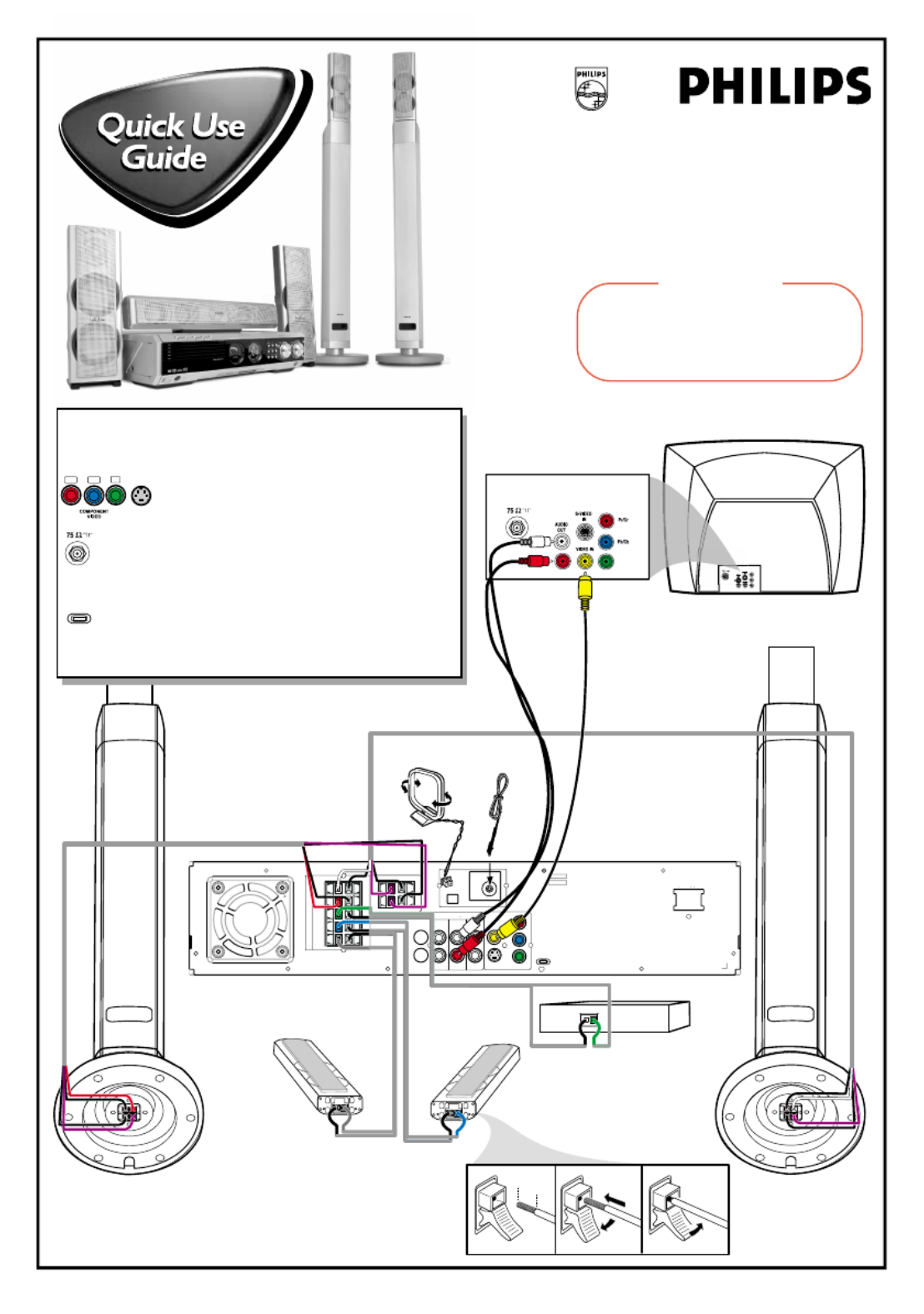
Use this simple and quick way to
watch your favorite DVD movie
and enjoy your Home Cinema
experience!
Connecting
Speaker Cable
Helpful Hints
You only need to make one video connection to your TV in order to view
the DVD playback.
If your TV has S-Video or Component (Pr Pb Y)
video jacks, use one of these video connections instead
for higher picture quality.
If your TV has only a single Antenna In jack, you will need an
accessory RF modulator. The RF modulator converts the video from
the DVD system so it can play through the TV’s Antenna connector.
Refer to your owner’s manual for proper connection.
Do not switch the P-SCAN to ‘ON’ position, unless you have
connected the DVD system to a Progressive Scan TV using the
Component (Pr Pb Y) video jacks.
When listening to TV programs, press TV/AV button on the remote to
set the DVD system to TV/AV mode in order for the sound to be heard.
Pr/Cr Pb/Cb Y
Y
Y
YY
S-VIDEO
IN
ANTENNA IN
P-SCAN
ON OFF
12nc: 3139 115 22091
Printed in China
IMPORTANT!
Attach the front speakers to the subwoofer stands
and the rear (surround) speakers to the mini
speaker stands before making the connections to
the DVD system. Refer to owner’s manual for
detailed set up instructions.
Probleemoplossing Philips MX5600D
Als je de handleiding al zorgvuldig hebt gelezen maar geen oplossing voor je probleem hebt gevonden, vraag dan andere gebruikers om hulp
Specificaties
| Merk: | Philips |
| Categorie: | Home cinema set |
| Model: | MX5600D |