Pioneer
Niet gecategoriseerd
CA-R-RF.004
Pioneer CA-R-RF.004 Handleiding
Hier is de Pioneer CA-R-RF.004 (Niet gecategoriseerd) gebruikershandleiding. 1 pagina's in taal Engels met een gewicht van 1,200,700.0 Mb. Als u geen antwoorden op uw probleem kunt vinden Vraag het onze community.
Pagina 1/1
Installation Manual CA-R-RF.004
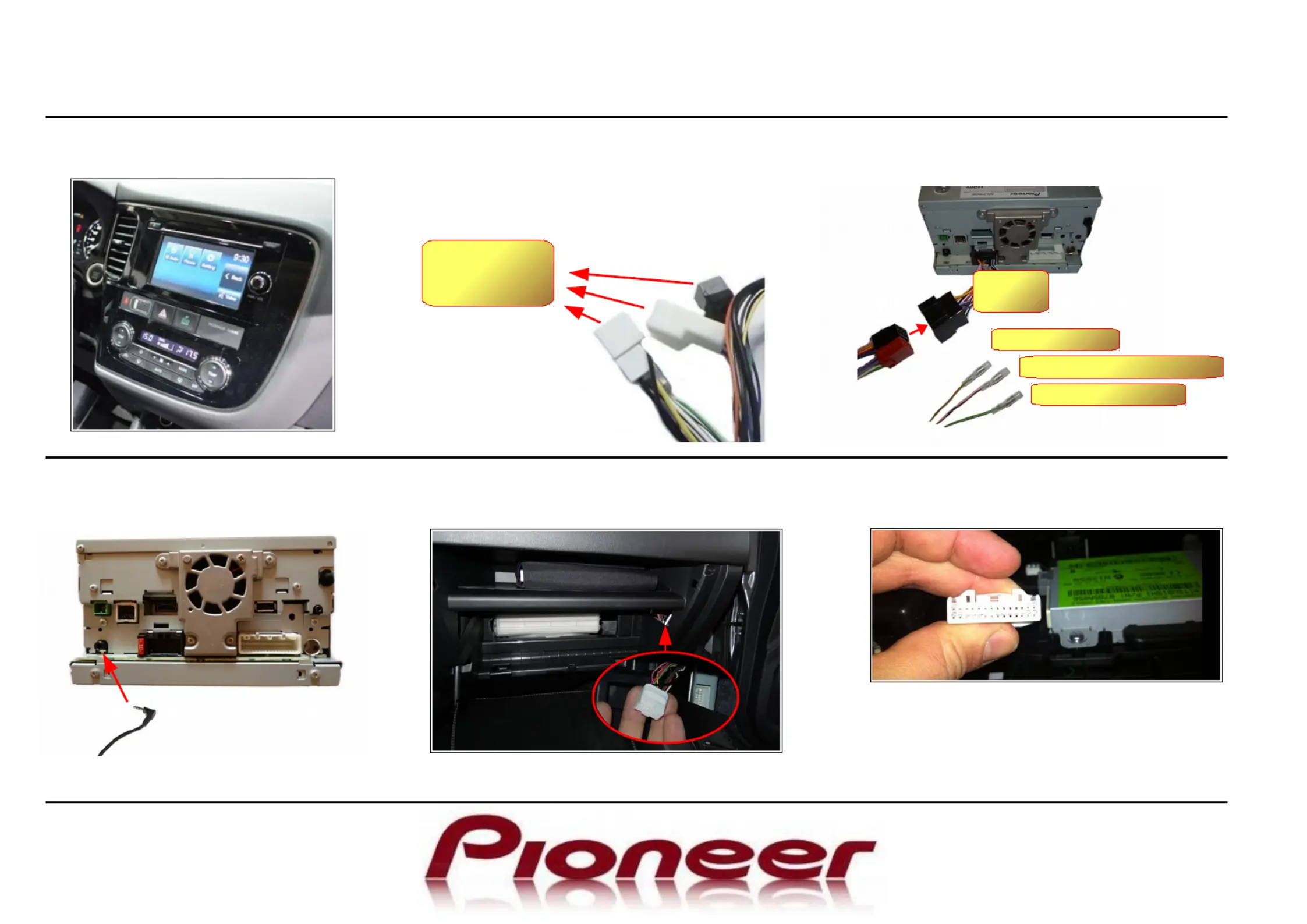
Mitsubishi Outlander SWC with Rockford Fosgate Amplifier
Installation must be performed by a qualified professional installer only. The manufacturer is not liable for any kind of incidental or indirect damages.
03/2014 All rights reserved. No liability for misprints
1 Remove the original head unit.
2 Take the supplied harness and connect
to the car's connectors. If the car is not
equipped with rear view camera, the
yellow connector will remain open.
CAR
HARNESS
4 Connect the SWC jack and all
other needed connectors.
5 If the OEM head unit is DAB ready, unplug
the DAB connector behind the glovebox.
3 Connect the ISO to the radio harness and
bushings for services.
GREEN PARKING↔
PURPLE/WHITE REVERSE↔
PINK SPEED↔
RADIO
HARNESS
6 Disconnect the Bluetooth interface located
under the OEM unit.
Test the full functionality and fix the radio
frame. Note that after installation the fader
is no longer available.
Probleemoplossing Pioneer CA-R-RF.004
Als je de handleiding al zorgvuldig hebt gelezen maar geen oplossing voor je probleem hebt gevonden, vraag dan andere gebruikers om hulp
Specificaties
| Merk: | Pioneer |
| Categorie: | Niet gecategoriseerd |
| Model: | CA-R-RF.004 |