Samsung
Niet gecategoriseerd
YP-T6
Samsung YP-T6 Handleiding
Hier is de Samsung YP-T6 (Niet gecategoriseerd) gebruikershandleiding. 3 pagina's in taal Engels met een gewicht van 0.2 Mb. Als u geen antwoorden op uw probleem kunt vinden Vraag het onze community.
Pagina 1/3
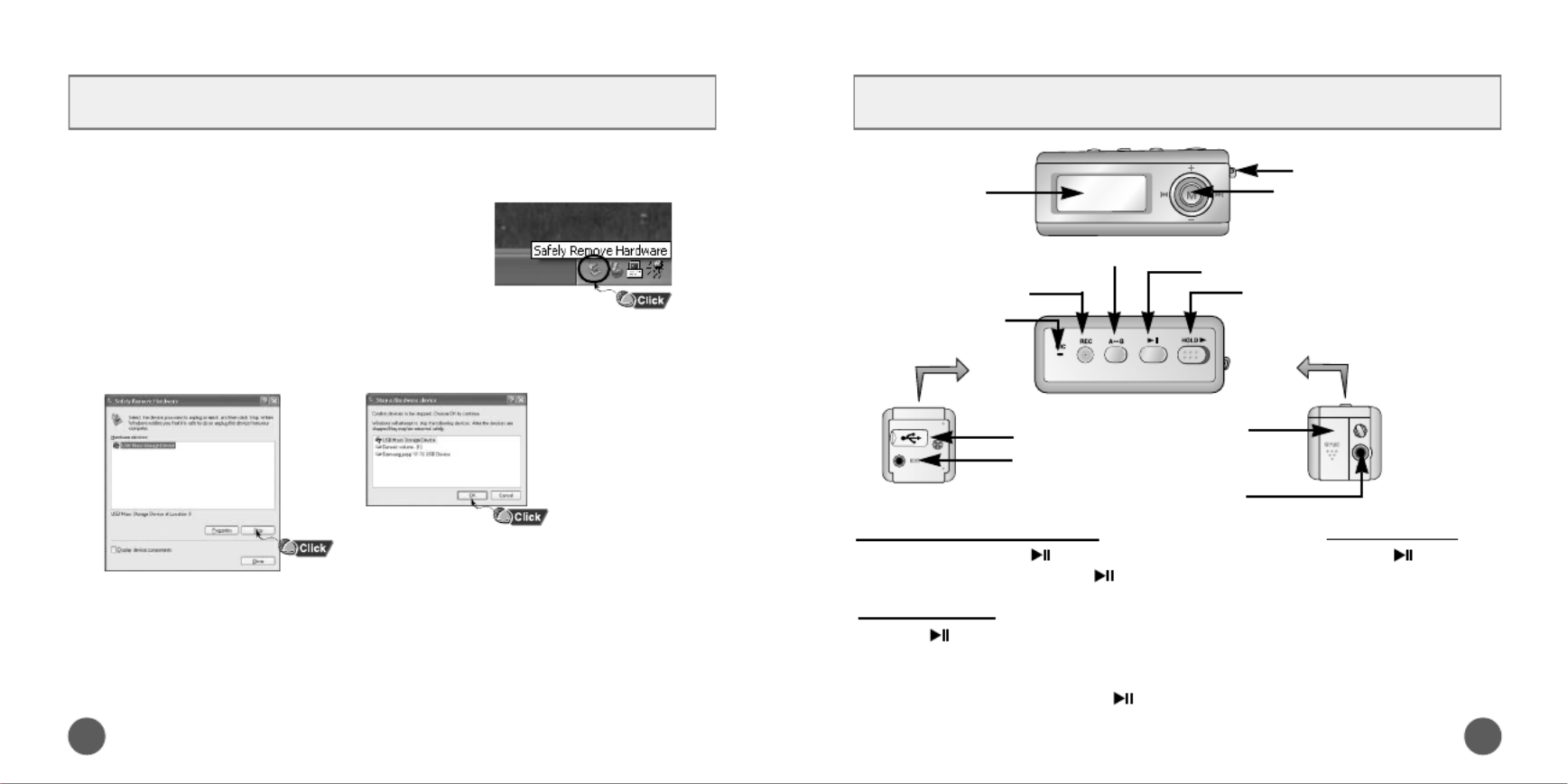
Location of Controls
1
YP-T6 Quick Guide
Recording Button
Play/Pause Button
Hold Switch
Loop Repeating Button
USB Cable
Connection Port
ENC Jack
Neck strap Hook
MENU, Navigation button/
Move to Track/Speed Search/
Volume Button
Display
Battery Cover
Earphone Jack
Microphone
Turning Power On and Off Playing Music
Pausing Music
●Power On : Press the button to turn on the power.
●Power Off : Press and hold the button to turn off the power.
Press the button.
●Playback starts.
Press the button to pause playback.
●If no buttons are pressed within 10 seconds(changes depending on settings),
the yepp automatically powers off.
●While in Pause mode, briefly press again to resume playback.
Disconnecting the USB cable
After completing the file transfer, you must disconnect the cable in the following way:
4AH68-00000A (Rev 0.0)
1 Double-click on the green arrow in the
taskbar on the bottom right of the window.
2 When the [Stop a Hardware device] message appears,
press the [OK] button and disconnect the USB cable.
k
Probleemoplossing Samsung YP-T6
Als je de handleiding al zorgvuldig hebt gelezen maar geen oplossing voor je probleem hebt gevonden, vraag dan andere gebruikers om hulp
Specificaties
| Merk: | Samsung |
| Categorie: | Niet gecategoriseerd |
| Model: | YP-T6 |