Xiaomi Mi WiFi Router 3 Handleiding
Hier is de Xiaomi Mi WiFi Router 3 (Router) gebruikershandleiding. 4 pagina's in taal Engels met een gewicht van 0.9 Mb. Als u geen antwoorden op uw probleem kunt vinden Vraag het onze community.
Pagina 1/4
Mi Wi Fi Router 3
Quick installation
Thank you for choosing Mi Router 3
Three steps to new Smart life
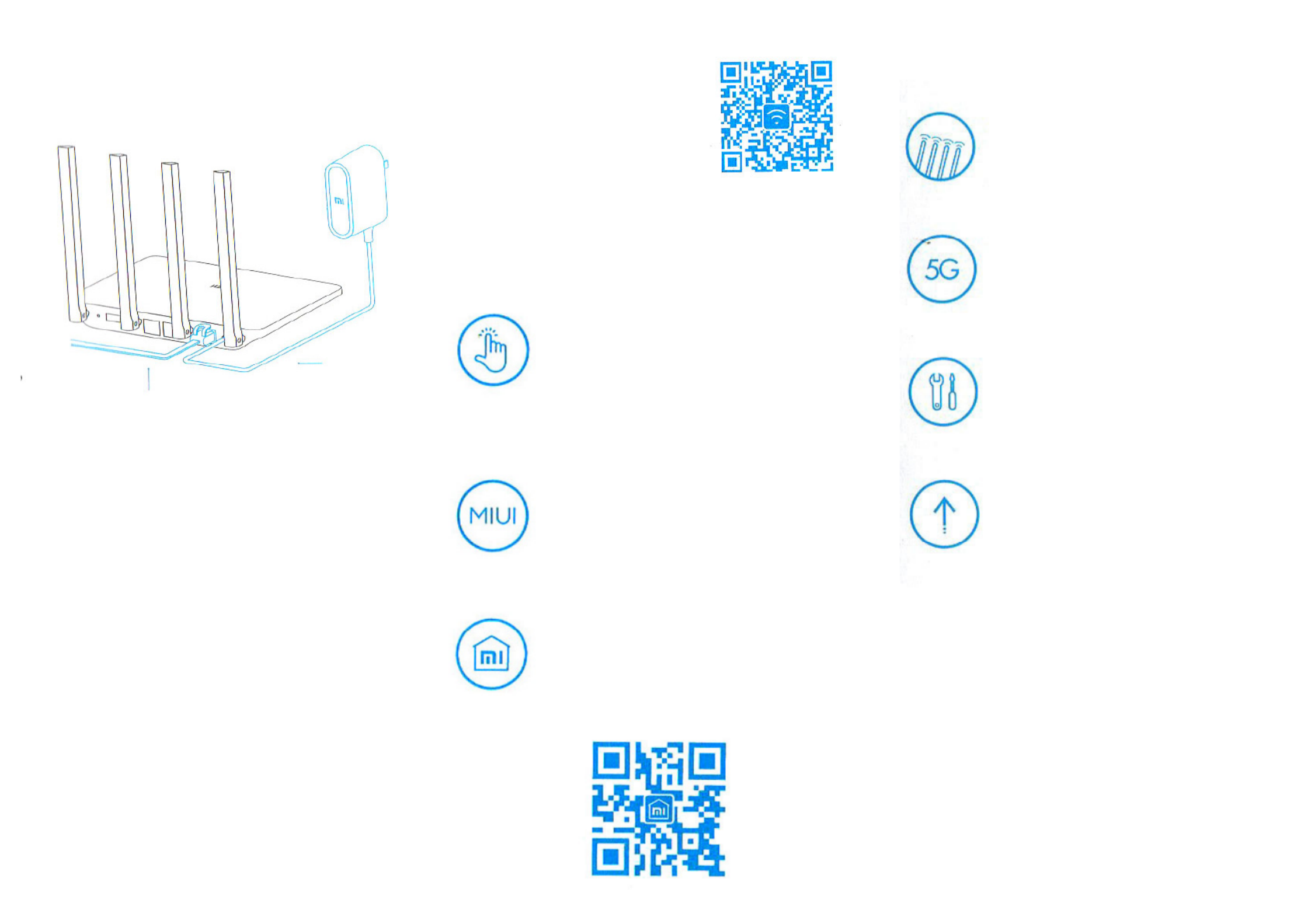
1. Power and net cabel setting
Connect the power adapter, then plug the external
power cord to the appropriate connector of the router.
* Connect one end of the cable to the ber / home
gateway / adsl modem
If you do not have the above devices, connect the
router to a home network cable.
2. ConnectiontoWinetwork
Use your smartphone or computer to search for
and connect devices to set up a Wi network
Xiaomi _ xxxx.
* If you connect the router to your computer using
a network cable, skip this step
* Xxxx - this is the last 4 MAC-address of the
router, which can be checked at the bottom of the
router
3. Open web browser or mobile APP
Scan the QR-code to download
the mobile app Mi Router. To
set a password, visit miwi.com
site, or enter the IP address of
the modem 192.168.31.1.
Smart Home
Manage Mi router using an installed application
MIUI «Mi Smart Home APP» of the system
WIFI acceleration in one click
Click on the «acceleration» and the
router will automatically select the
optimum channel to increase network
speed.
Lockscreen management in one click
Support MIUI system, lockscreen
control, interaction with other Smart
devices in home.
«SmartHomeАРР»installation
Find «Mi Smart Home APP» app at Mi
Store or scan the QR-code, and install
the app on your smartphone.
Introducing
4 outer antennas, wider signal
coverage
Using of powerful Franklin
antenna, supporting for cross-
function signal through walls
Two-channel AC network,
speed increased up to 3
Supporting of 802.11АС protocol,
network speed to 1167Mbps
Pairing with mobile app, more
new functions
Network security, rewall, WiFi
sharing, broadband acceleration
feature.
Smart operating system,
continuously updated and
completely safe
MI WIFI Smart Router Operating
System, continuous optimization
and upgrades provide permanent
security of the router.
XIAOMI-MI.COM
Probleemoplossing Xiaomi Mi WiFi Router 3
Als je de handleiding al zorgvuldig hebt gelezen maar geen oplossing voor je probleem hebt gevonden, vraag dan andere gebruikers om hulp
Specificaties
| Producttype: | Router om neer te zetten |
| Kleur van het product: | Wit |
| Gewicht: | 220 g |
| Breedte: | 195 mm |
| Diepte: | 131 mm |
| Hoogte: | 177.3 mm |
| Gebruikershandleiding: | Ja |
| Materiaal behuizing: | Acrylonitrielbutadieenstyreen (ABS) |
| Typisch stroomverbruik: | 2 W |
| Temperatuur, in bedrijf: | 0 - 40 °C |
| Processormodel: | MediaTek MT7620 |
| Wi-Fi-standaarden: | 802.11a,Wi-Fi 5 (802.11ac),802.11b,802.11g,Wi-Fi 4 (802.11n) |
| Generatie mobiel internet: | 4G |
| USB-poort: | Ja |
| Ethernet LAN: | Ja |
| Type stroombron: | DC |
| Inclusief AC-adapter: | Ja |
| Aantal USB 2.0-poorten: | 1 |
| Aantal Ethernet LAN (RJ-45)-poorten: | 2 |
| Aansluiting voor netstroomadapter: | Ja |
| Relatieve luchtvochtigheid, in bedrijf: | 10 - 90 procent |
| Type processor: | Ja |
| SIM-kaartsleuf: | Nee |
| 3G/4G USB modem compatibiliteit: | Nee |
| Geheugenkaart slot(s): | Nee |
| RJ-11 ports kwantiteit: | 1 |
| Modulatie: | 16-QAM,64-QAM,256-QAM,BPSK,CCK,DBPSK,DQPSK,DSSS,OFDM,QPSK |
| Wifi-band: | Dual-band (2.4 GHz / 5 GHz) |
| Wifi-standaard: | Wi-Fi 5 (802.11ac) |
| WLAN gegevensoverdrachtsnelheid (max): | 1167 Mbit/s |
| WLAN gegevensoverdrachtsnelheid (eerste band): | 300 Mbit/s |
| WLAN gegevensoverdrachtsnelheid (tweede band): | 867 Mbit/s |
| Gevoeligheid ontvanger: | 11Mbps:≤-90dBm,54 Mbps:≤-72dBm,\nHT20 MCS7:≤-69dBm\nHT40 MCS7:≤-66dBm\nVHT20 MCS8:≤-65dBm\nVHT40 MCS9:≤-60dBm\nVHT80 MCS9:≤-58dBm |
| Interfacetype Ethernet LAN: | Fast Ethernet |
| Ethernet LAN, data-overdrachtsnelheden: | 10,100 Mbit/s |
| Bekabelingstechnologie: | 10/100Base-T(X) |
| Netwerkstandaard: | IEEE 802.11a,IEEE 802.11ac,IEEE 802.11b,IEEE 802.11g,IEEE 802.11n,IEEE 802.3,IEEE 802.3u |
| Softwaretalen ondersteund: | Vereenvoudigd Chinees |
| Ondersteunde beveiligingsalgoritmen: | WPA-PSK,WPA2-PSK |
| Soort antenne: | Extern |
| Antennas quantity: | 4 |
| Antenne versterkingsniveau (max): | 6 dBi |
| Ondersteunt Windows: | Ja |
| 3G: | Nee |
| 4G: | Nee |
| Stroomverbruik (typisch): | 2 W |
| Bedrijfstemperatuur (T-T): | 0 - 40 °C |
| Relatieve vochtigheid in bedrijf (V-V): | 10 - 90 procent |
| Type product: | Router om neer te zetten |
| Antenne-ontwerp: | Extern |