Defender Phantom PRO Handleiding
Hier is de Defender Phantom PRO (Headset) gebruikershandleiding. 2 pagina's in taal met een gewicht van 561,448.0 Mb. Als u geen antwoorden op uw probleem kunt vinden Vraag het onze community.
Pagina 1/2
Phantom Pro
Wireless stereo headset
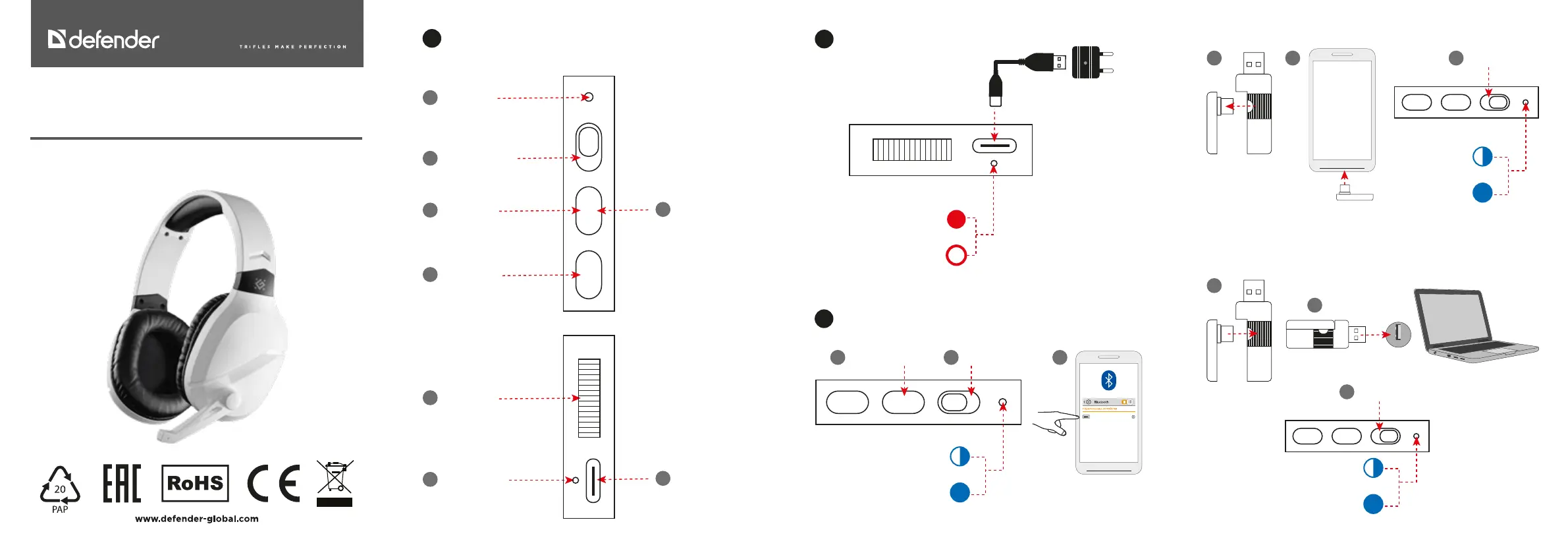
Functions
1.
Status indicator
1
Bluetooth/2.4G switch
2
Click Play/Pause
3
Click - Mic On/O
5
Volume control
6
Charging indicator
7
Long press - On/O
4
Type C slot
8
Charging
2.
Type-C
* The charger
is sold separately
230V
Charging
Charged
NOTE
The charge level display for smartphone is approximate. Incorrect display of the charge level is not a breakdown.
NOTE
If the headset is not connected to the smartphone, it will automatically turn o after 5 minutes.
Connection
Bluetooth
3.
Switch to BluetoothLong press 3 sec to turn on
1 2 3
64580
Phone search
Connected
Switch to 2.4G
1 2 3
Dongle search
Connected
2.4G dongle, connecting to a smartphone
2.4G dongle, connecting to a computer, laptop, PS4, PS5
Switch to 2.4G
1
2
3
Dongle search
Connected
USB
Probleemoplossing Defender Phantom PRO
Als je de handleiding al zorgvuldig hebt gelezen maar geen oplossing voor je probleem hebt gevonden, vraag dan andere gebruikers om hulp
Specificaties
| Merk: | Defender |
| Categorie: | Headset |
| Model: | Phantom PRO |