Defender Tsunami Handleiding
Hier is de Defender Tsunami (Headset) gebruikershandleiding. 8 pagina's in taal met een gewicht van 3,443,030.0 Mb. Als u geen antwoorden op uw probleem kunt vinden Vraag het onze community.
Pagina 1/8
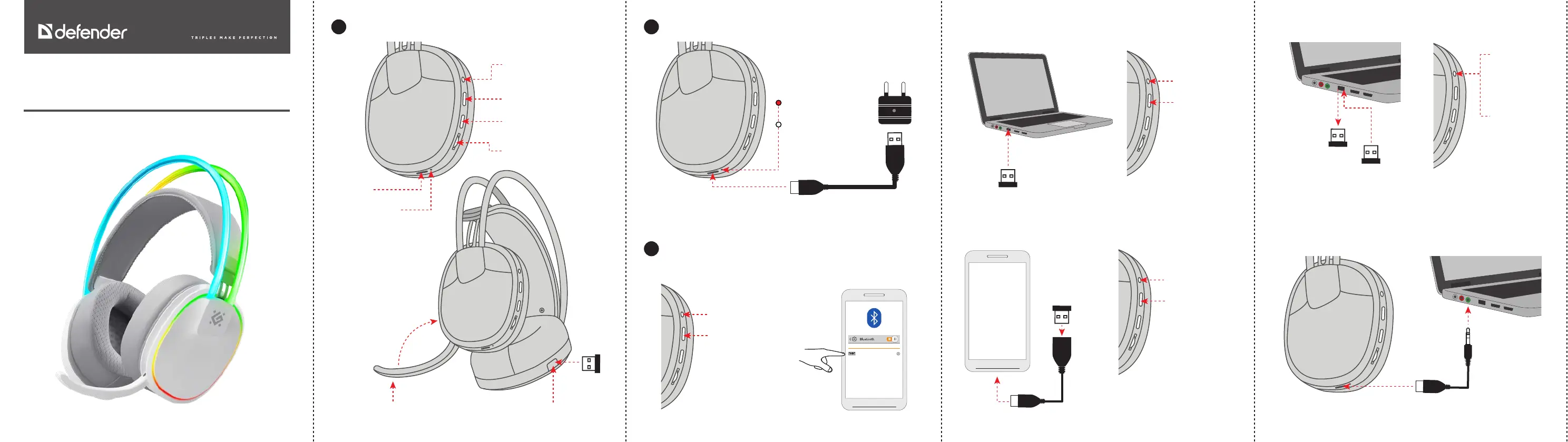
Functions
1.
Charging
2.
Tsunami
Wireless stereo headset
Operation manual
NOTE
The charge level display for smartphone is approximate. Incorrect display of
the charge level is not a breakdown.
Raise
the microphone - off
Lower the microphone - on Storage space for the USB receiver
USB A - Type C
230V
Connection
3.
64695
CONNECTED DEVICES
Bluetooth
1. Long press
3 sec to turn on
2. Switch to
Bluetooth
(long press 3 sec)
3.
2.4G dongle, connecting to a smartphone
2. Long press
3 sec to turn on
3. Switch to 2.4G
(long press 3 sec)
OTG adapter (sold separately)
1.
2.4G dongle, connecting to a computer, laptop, PS4, PS5
2. Long press
3 sec to turn on
3. Switch to 2.4G
(long press 3 sec)
1.
1.
Pairing a USB receiver and headset
3. Hold the
power button
for 5 seconds,
the indicator
will blink green
2. Turn off
the headset
by holding
the power
button for
5 seconds
1. Disconnect
the USB
receiver from
the USB port
4. Connect the USB
receiver to the USB
port, the green light
is always on
Wired connection to a smartphone, laptop, PS4, PS5, XBOX ONE,
XBOX Series S gamepads
Type C -
3.5 mm TRRS
The
charger
is sold
separately
Charging
Charged
Click - play/pause
Long press 3 sec - On
Long press 5 sec - Off
Click - previous track,
Long press 3 sec - Bluetooth/
2.4G switch
Click - previous track,
Long press 2 sec -
backlight on/off
Volume control
Charging indicator
Type C slot
Probleemoplossing Defender Tsunami
Als je de handleiding al zorgvuldig hebt gelezen maar geen oplossing voor je probleem hebt gevonden, vraag dan andere gebruikers om hulp
Specificaties
| Merk: | Defender |
| Categorie: | Headset |
| Model: | Tsunami |