Fantech P31 Handleiding
Hier is de Fantech P31 (Keyboard) gebruikershandleiding. 1 pagina's in taal met een gewicht van 662,472.0 Mb. Als u geen antwoorden op uw probleem kunt vinden Vraag het onze community.
Pagina 1/1
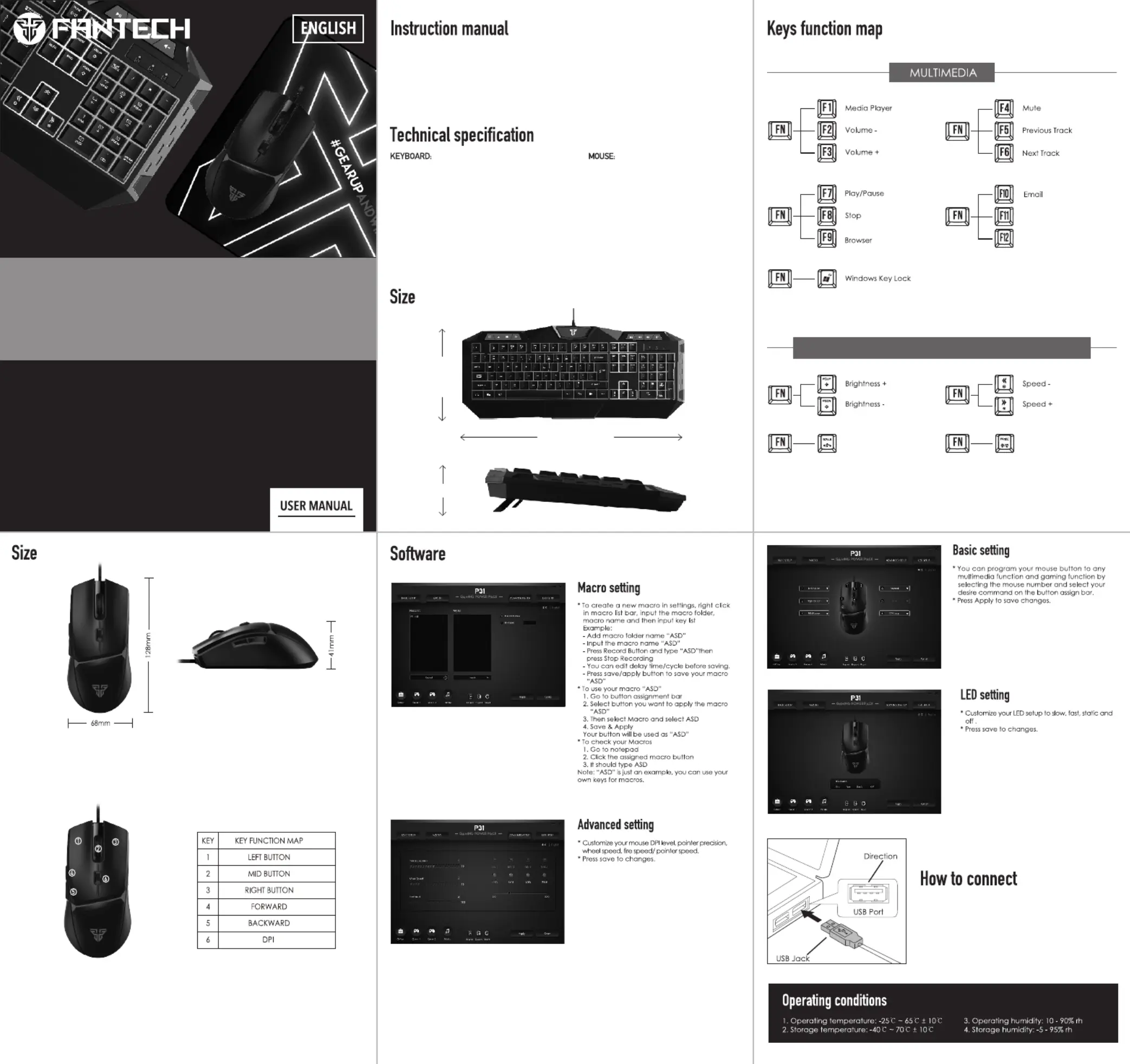
What’s included in the box
Fantech P31 gaming keyboard
2. Fantech P31 gaming mouse
3. Fantech P31 mousepad
4. User’s manual
1.
Thank you for purchasing Fantech P31 Gaming Power Pack.
Fantech P31 is an essential gaming set, no need to install any driver for your first use.
• On-the-fly adjustable DPI (200-8000)
Speed/Acceleration: 60ips/20g
Polling rate: 125Hz
Huano 5 million clicks lifetime
1.8m nylon braided cable
Silicon rubber roller
RGB 4 color lighting
Size: 128*68*41mm
•
•
•
•
•
•
•
Its plug and play. Connect the mouse and keyboard
to computer by inserting USB jack to your computer
USB port.
P31
G A M I N G P O W E R PA C K
• Type: Backlit floating-keys multimedia
gaming keyboard
Number of keys: 104 keys
10 million keystroke lifetimes
26 keys anti-ghosting
1000Hz ultra polling rate
•
•
•
•
• Size: 466*155*42mm
P31
G A M I N G P O W E R PA C K
My computer
42mm
Full lock
466MM
155MM
LIGHTING MODE
System requirements
1. Operating systems: Windows XP/7/8/10;MAC OS
2. One free USB 2.0/3.0 port
LIGHTING ON/OFF
ADJUSTING LIGHTING BRIGHTNESS AND SPEED
Keys function map
Probleemoplossing Fantech P31
Als je de handleiding al zorgvuldig hebt gelezen maar geen oplossing voor je probleem hebt gevonden, vraag dan andere gebruikers om hulp
Specificaties
| Merk: | Fantech |
| Categorie: | Keyboard |
| Model: | P31 |