LG
Niet gecategoriseerd
GCC-H21N
LG GCC-H21N Handleiding
Hier is de LG GCC-H21N (Niet gecategoriseerd) gebruikershandleiding. 4 pagina's in taal Engels met een gewicht van 0.7 Mb. Als u geen antwoorden op uw probleem kunt vinden Vraag het onze community.
Pagina 1/4
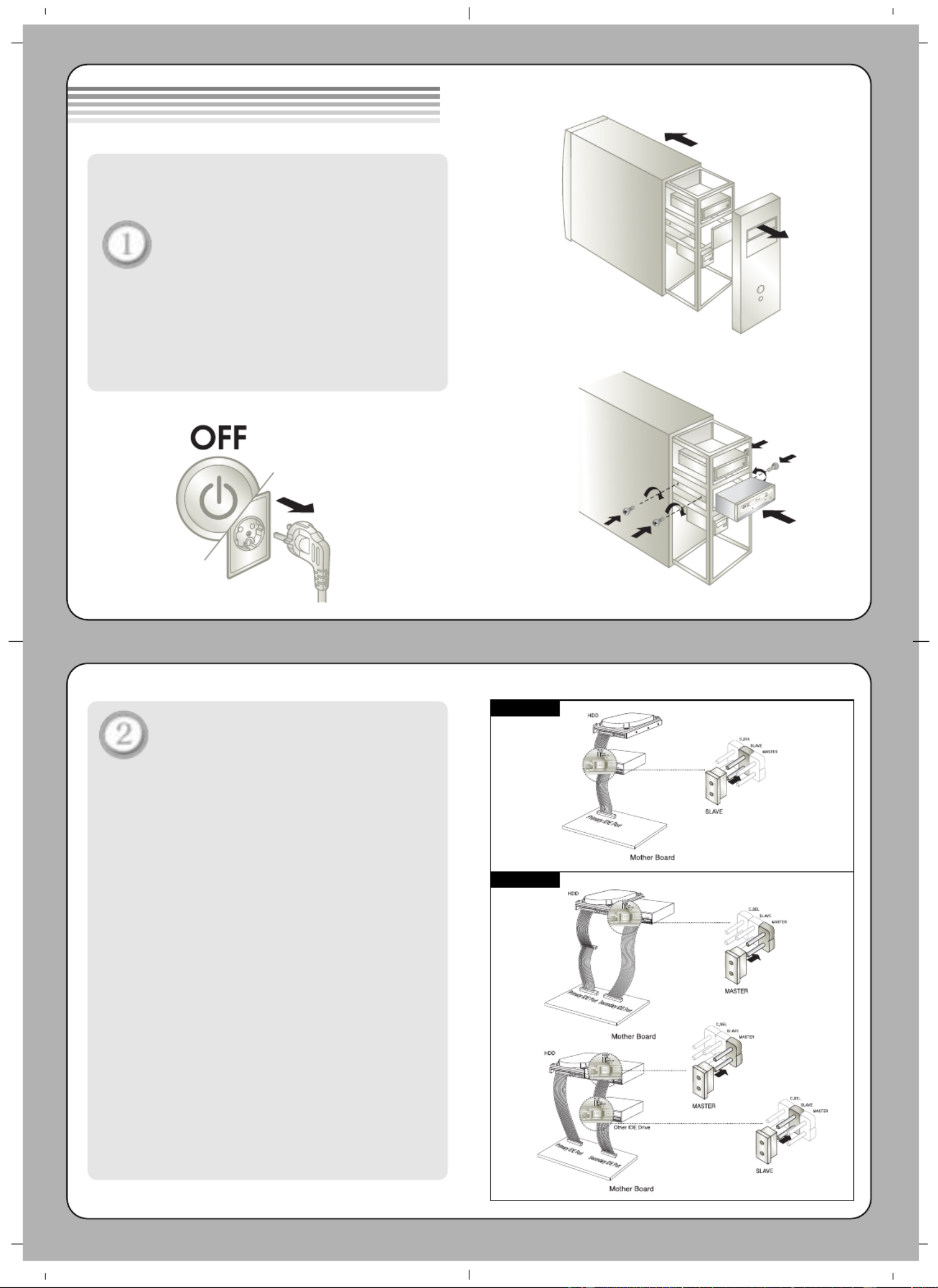
Before installing the drive, turn off
the system power.
Disconnect the power cord,
and remove the cover.
• Remove a vacant 5.25” drive bay panel from
the computer. Slide the drive into the drive
bay.
Set the jumper on the rear of
the drive as necessary.
A. When using a Primary IDE port
If you need to connect your drive to the same
primary IDE channel as the hard drive, the drive
should be set to SLAVE position.
B. When using a Secondary IDE port
❶ If there is no device connected to the
secondary IDE channel, connect the
drive to this channel and set the jumper
to MASTER.
❷ When two drives are connected, set one
drive to MASTER and the other drive to
SLAVE. If your operating system encounters
interface problems after installing the new
drive, try swapping the jumpers or move
one drive to another IDE channel.
Installing the Drive
Method A
Method B
DIGIT AL A NALO G
INTE RFA CE OW E
R
DRCSM
SLA
GL
G39
1
++12
GN D
40
2
AUD IO AUDIO
CD Rewriter/DVD-ROM Drive
CD Rewriter/DVD-ROM
Drive
DIGIT AL ANALO G
IN
TE RFA CE PO
WER
DRCSM
SLA
GL
G
39 +
5+12
GN D
40
AUD IO AUDIO
CD Rewriter/DVD-ROM Drive
DTA L
AN ALOG
IN TE
RFA CE PO W
ER
D
RC
SM
S
LA
GL
G39
1
+5 +12GND
40
2
ADIO AUDIO
DIG ITAL ANA LOG
INT E
RFAC EPOW ER
D
RC
SMS
LA
GL
G39
1
5+12
GN D
40
2
AUDIO AUD IO
First Drive
Second Drive
CD Rewriter/DVD-ROM
Drive
CD Rewriter/DVD-ROM
Drive
Probleemoplossing LG GCC-H21N
Als je de handleiding al zorgvuldig hebt gelezen maar geen oplossing voor je probleem hebt gevonden, vraag dan andere gebruikers om hulp
Specificaties
| Merk: | LG |
| Categorie: | Niet gecategoriseerd |
| Model: | GCC-H21N |