Mikrotik
Access point
LDF 5
Mikrotik LDF 5 Handleiding
Hier is de Mikrotik LDF 5 (Access point) gebruikershandleiding. 3 pagina's in taal Engels met een gewicht van 0.3 Mb. Als u geen antwoorden op uw probleem kunt vinden Vraag het onze community.
Pagina 1/3
LDF series
The LDF (Lite dish feed) is an outdoor wireless system with a built in antenna, meant to be installed on satellite
offset dish antennas. The device comes preinstalled with RouterOS and is ready to use.
Assembly
The device is compatible with standard offset dishes, commonly used for satellite television. The offset mount is
universal at 40mm diameter, and the LDF can easily be placed inside it. !
!
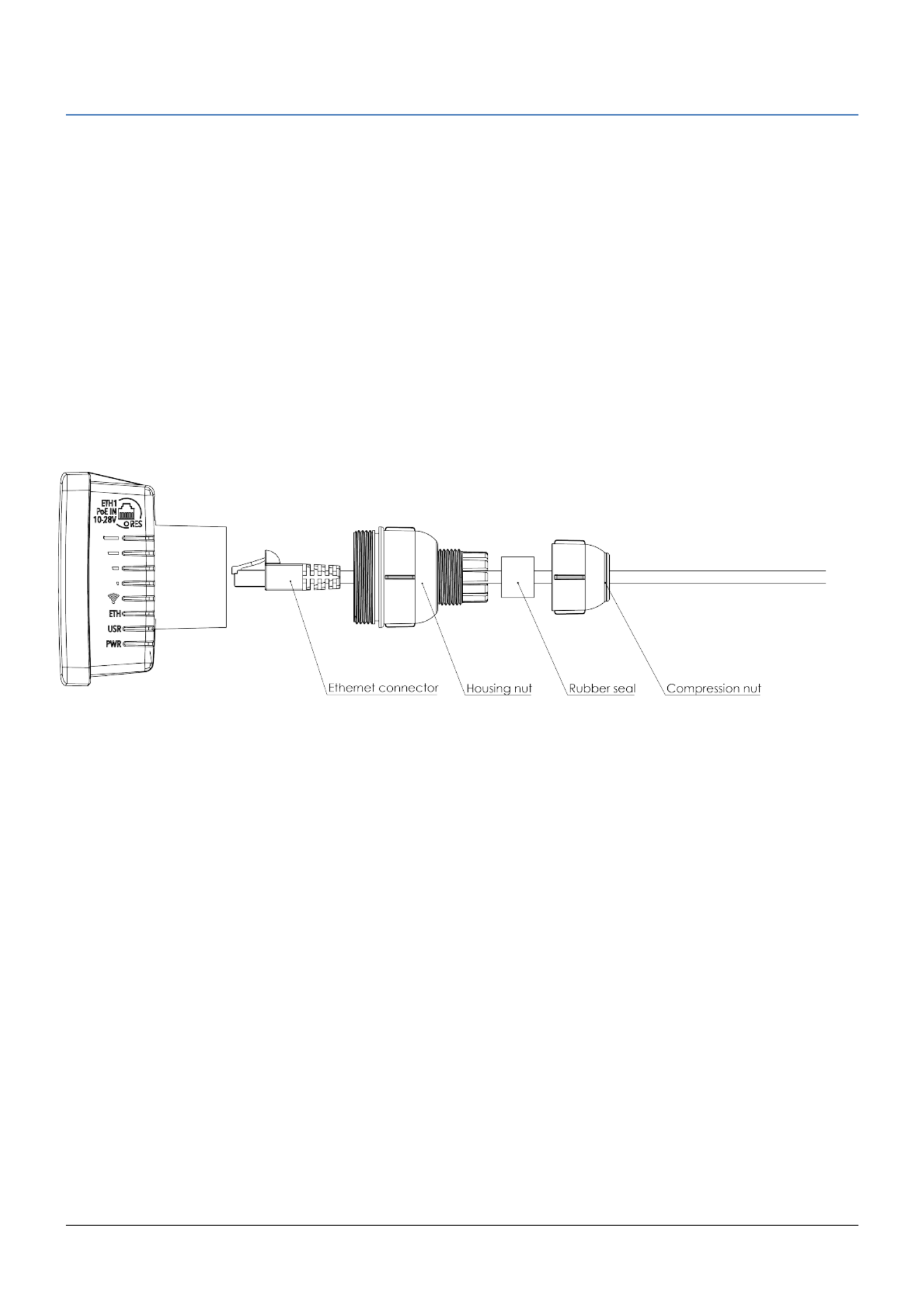
To attach the ethernet cable to the LDF unit, follow these steps:
1. Assemble all components as shown in the illustration. If using pre-made cables, cut the rubber seal on one
side, to put it onto the cable. Self crimped cables should be crimped after the seal is on the cable
2. Connect ethernet cable to ethernet connector on LDF
3. Attach Housing nut to LDF body by rotating clockwise
4. Slide rubber seal into housing nut
5. Enclose the waterproof gland by turning compression nut clockwise
Powering
The device accepts 10-28V DC input from passive Power over Ethernet injectors. The device does not work with
IEEE802.3af compliant 48V power injectors. A PoE injector is included in the package.
Connecting
1. Connect an ethernet cable to the ethernet port, connect the other end of the Ethernet cable to a PoE injector.
Plug the PoE injector into your PC or into your local network switch.
2. Set your computer IP configuration to (DHCP). automatic
3. Default IP address of the unit is 192.168.88.1, open this address in your web browser to start configuration.
The username is and there is admin no password. !
See RouterOS documentation for more information about features and their configuration options: !
http://wiki.mikrotik.com/wiki/Manual:TOC
Extension Slots and Ports
• One Integrated Wireless 5GHz 802.11a/n, 2x2 MIMO with built in antenna, max gain 9dBi + the gain of the
dish that it is mounted in.
• One 10/100 Ethernet port, supporting automatic cross/straight cable correction (Auto MDI/X), so you can use
either straight or cross-over cables for connecting to other network devices.
See www.routerboard.com for more information. Contact support@mikrotik.com for support questions. 26/09/2016
Probleemoplossing Mikrotik LDF 5
Als je de handleiding al zorgvuldig hebt gelezen maar geen oplossing voor je probleem hebt gevonden, vraag dan andere gebruikers om hulp
Specificaties
| Kleur van het product: | Wit |
| Breedte: | 84 mm |
| Diepte: | 84 mm |
| Hoogte: | 115 mm |
| LED-indicatoren: | Power,WLAN |
| Frequentie van processor: | 600 MHz |
| Processormodel: | AR9344 |
| Inclusief besturingssysteem: | RouterOS |
| Frequentieband: | 5 GHz |
| Type stroombron: | DC |
| Aantal Ethernet LAN (RJ-45)-poorten: | 1 |
| Vermogensverbruik (max): | 6 W |
| Intern geheugen: | 64 MB |
| Bedoeld voor: | Buiten |
| Type processor: | Ja |
| Ingangsspanning: | PoE 10-30 V |
| Ethernet LAN, data-overdrachtsnelheden: | 10,100 Mbit/s |
| Netwerkstandaard: | IEEE 802.11a,IEEE 802.11b,IEEE 802.11n |
| Antenne versterkingsniveau (max): | 9 dBi |
| Draadloos LAN data-overdrachtsnelheid (max): | 54 Mbit/s |
| Flash memory: | 16 MB |
| Maximale overdrachtssnelheid van gegevens: | 100 Mbit/s |
| 2,4 GHz: | Nee |
| 5 GHz: | Ja |
| Power over Ethernet (PoE): | Ja |
| AC-ingangsspanning: | 10 - 30 V |
| Bedrijfstemperatuur (T-T): | -40 - 70 °C |